

Tomas Egger
-
Posts
3517 -
Joined
-
Last visited
-
Days Won
20
Content Type
Profiles
Forums
Events
Everything posted by Tomas Egger
-
Ola Paul, We are trying now to finish the last Optimization bugs and then jump to the remaining bugs from our list. I cant give you a exact date, but we want to finish the beta asap. Thanks Tom
-

Animator cannot be opened because of a problem
Tomas Egger replied to sphaera's topic in Technical issues
Ola MFDH! I was installing in a new Mac Book Pro this weekend, after manually install the frameworks, the machine didnt recognize the hardware dongle too! So, I installed the Safenet installers from the "Sphaera" post, then the dongle started to work! Btw: amazing new machine you have! EIAS9 will love it!! Thanks Tom -
Ola Kurt! Nice.. :) Thanks Tom
-
Editing HD Animation without lose of quality
Tomas Egger replied to robertb's topic in EIAS General Forum
Ola Rob! Im glad it worked! Show us your work later :) Thanks Tom -
Editing HD Animation without lose of quality
Tomas Egger replied to robertb's topic in EIAS General Forum
Ola Rob! First of all, use PNG codec instead of Animation codec, its lossless but it have only 1/3 of Animation codec size. Hmmm... You could export from After Effects 2 output modules, on High-rez and one Low-rez with a H264 codec fora example, edit with H264 to have a fast feedback and then replace with PNG codec to output in High-rez. Thanks Tom -
Ola Ken! You can try SIlo, which does UV unwrap and modeling and its cheap :) http://www.nevercenter.com/silo/ Thanks Tom
-
Ola Ken, You can have some workflows: First: 1) Do a print screen of your view ports in wireframe mode (Top, Side, Front) of your box. 2) Do a precise match of each texture side in Photoshop, counting with some feather border if you need (to mix better the textures). 3) Add the texture in the Box and choose which Alignment, Front, Back, Top and so on 4) Change the Auto Edit pop-up from None to XY (it will make the texture in the correct proportion) 5) Then you will need only to change the depth of the texture and turn-off the Negative Z. Second approach: 1) Open your model in a UV unwrap software. http://www.uvmapper.com/ 2) Do a print screen of your UV model wireframe and open in Photoshop 3) Do only one texture opened in Photoshop. 4) Load in EIAS only. Hope that helps Thanks Tom
-
Ola Scott, Im able to bring water mesh with Blair plug-in, but Realflow plug-in is not new and doesnt allow us to bring particles or Hard bodies, its not new. I already have the Realflow SDK, but right now, we are finishing EIAS 9. I really like the idea of Realflow connection update, Richard only pointed what we have right now. Thanks Tom
-
Ola, Bug FIxing, Bug Fixing.. Thanks Tom
-
Ola Scott and Steven! Blair’s plug-in works.. Sure, we would like to improve this idea further in the future.. :) Thanks Tom
-
Ola Anthony, Could you upload the project? http://www.eias3d.com/forums/topic/90-bug-track-system/ Thanks Tom
-
Ola, Beta Team just received the new optimized build (after our complex changes). Time to bug fixes! Thanks Tom
-
Ola Scott, As far we know (no report from users), no problem, but my advice is have two HD to run 10.7 and 10.6 or another partition until we release EIAS 9. Im running 3 HD, right now, 10.6, 10.7, Windows 7 64 bits. Thanks Tom
-
Ola Derryl, You can try to merge the project with “Merge Project using parent node†checked, then in the link window, turn the “inherit scale†on to all groups, but plug-ins have their own engine and world, so, its complex. If you dont have Placer animated, you could try to export it to bake the geometry and then re-import again, with inherit scale, it will work. Thanks Tom
-
Ola AVT, No, its not necessary. Thanks Tom
-
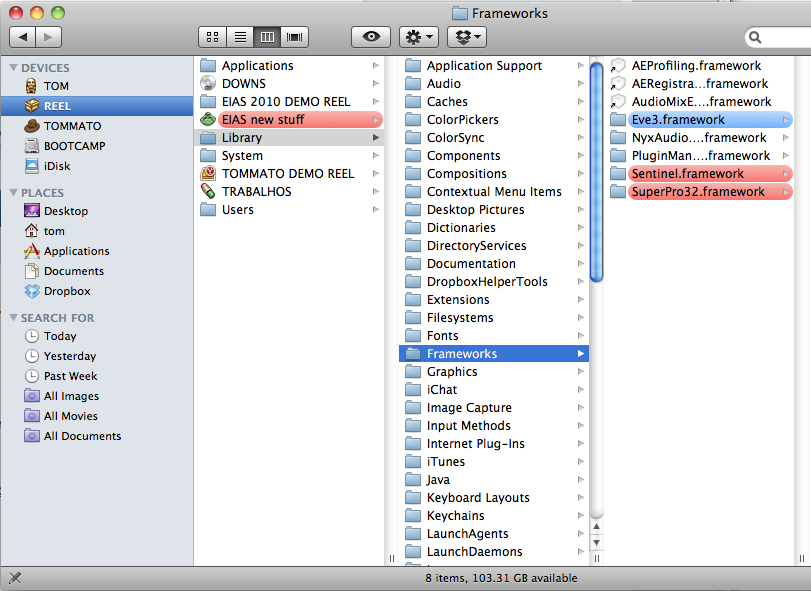
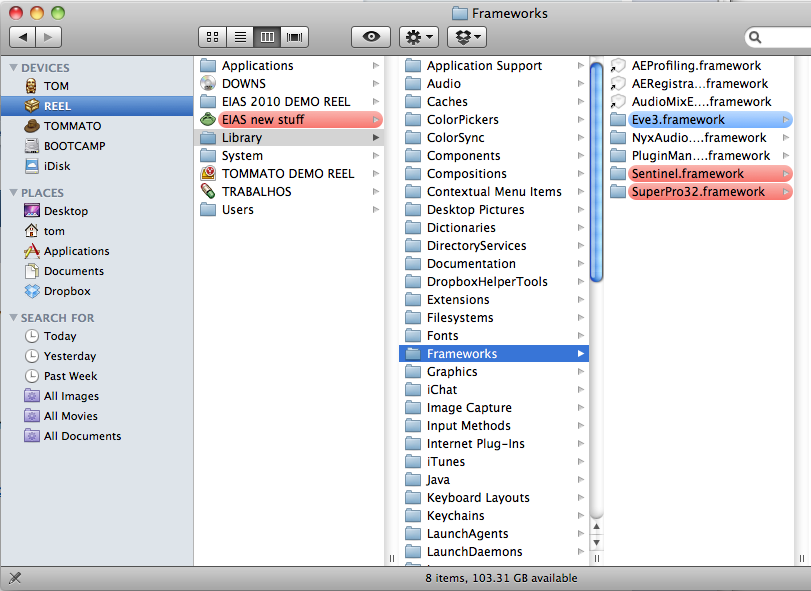
Ola Michel, The Frameworks need to be placed on the Root of your HD (Library folder), means you are placing them in the Library folder which is inside of Applications folder. Did you move the Library folder to your Application folder? Show me whats inside of your HD, please. Thanks Tom
-
Ola Francesco! Sure, I can post here when start to test the new optimized engine, not happened yet. Right now, a open beta will be complex problem to us, to be handled, we really want to finish 9 asap. Thanks Tom
-
Facebook ,You tube , Web hosting Question
Tomas Egger replied to Mark Johnston's topic in EIAS General Forum
Ola Maher, I prefer the Vimeo compression and Interface :) Thanks Tom -
Ola my friends, Please, follow these steps to make EIAS 8.0.0 run under OSX Lion 10.7.X Unzip this file and place these frameworks on this path: Frameworks.zip Feel free to message us. Thanks Tom

-
Ola Michel! Please, unzip this file and place these 3 frameworks on this path: Frameworks.zip Feel free to message us Thanks Tom

-
Facebook ,You tube , Web hosting Question
Tomas Egger replied to Mark Johnston's topic in EIAS General Forum
Ola Mark! We are based on Vimeo, why you don't try it? Thanks Tom -
Ola Chris! I will do my best always to help! Thanks Tom
-
Ola Mark!!! Thanks Tom
-
Ola Chris! I have OBJ2FACT 2.1.5, I think its the same: 1) Use the Open the folder option, choose the folder 2) When the OBJ2FACT interface appears, press the “control†key in the keyboard, the convert button will become “batch†button :) Hope that helps Thanks Tom
-
Ola Kevin!!! Totally COOL! I liked a lot!!! I will watch all later, lots of great works! Thanks Tom