Tomas Egger
-
Posts
3517 -
Joined
-
Last visited
-
Days Won
20
Content Type
Profiles
Forums
Events
Everything posted by Tomas Egger
-
Ola Thingmaker! I really understand your point and I agree. Are you using Mac or Pc? Do you have OBJ2FACT? Thanks Tom
-
Ola Phungus and David, I really understand your both feelings, EIAS 9 is our first upgrade, tons of details and we want to do our first step really well done, to explain clearly whats going on, we decided in the last minute do a optimization which we feel really necessary to all EIAS users, its not easy and we are working a lot to deliver it, its not finished yet, after that, the beta team will attack it and see if everything is going fine, see if we still have some bug to squash and we will be ready, I cant point exactly the time to finish right now. Phungus, as you pointed correctly, We don't like the procedure to promise a release date, e.g. Newtek and see the user base frustrated with several delays. Release EIAS 9 before LW and Modo is interesting, but right now, in our first upgrade, we are a lot more interested seeing EIAS users happier, and then, step by step, rebuilding our brand to the 3d market. We are remembering your wishes all the time, believe me. Thanks Tom
-
Ola Thomo, Send me the project, lets see what can I do! Thanks Tom
-

Lightwave Camera motion converter to EIAS
Tomas Egger replied to kikems's topic in EIAS General Forum
Ola Enrique!!! Awesome Utility :) Thanks Tom -
Ola my friend, I simply added your model on EIAS and did a test render. Thanks Tom

-
Ola Derryl, EIAS 9 allow us to import other formats than .FACT only, faster and better, but internally EIAS still converting them in FACT format, since Camera render based on our internal file format, maybe in the future, we will have more than FACT file format used by Camera :) Thanks Tom
-
Ola Kbartlez, You forgot to attach.. hehehe Thanks Tom
-
Ola Thomo, If you are in a huge deadline, please, send me the project, will be a pleasure to render for you. Do you have all Cameras with 2000MB (2GB) of ram assigned? Thanks Tom
-
Ola, One Strip only? is it not working in all slaves this specific strip? try to render it only in the local mode. Second, If 40 + AA works, try to use higher Primary rays until Camera 8 reach the limit to render. Thanks Tom
-
Ola Thomo, How many Primary Rays are you using in GI window? Are you using secondary rays too? are they necessary? Start with 40 Primary Rays and 0 Secondary rays, try again, without Anti-Aliases to speed up the tests. Thanks Tom
-
Ola Thomo, Are you using GI? any plug-in? turn off GI and Anti-Aliases in the render window, see if it render with 3600 pixels. Thanks Tom
-
Silly Question Regarding MForge
Tomas Egger replied to kbartlez's topic in EIAS Plug-ins and Shaders
Ola, Feel free to message us anytime ;) Thanks Tom -
Ola, In the bottom of the reply area, you will see a button named "more reply options" there you will have a option to attach a zip file for example. ;) Thanks Tom
-
Silly Question Regarding MForge
Tomas Egger replied to kbartlez's topic in EIAS Plug-ins and Shaders
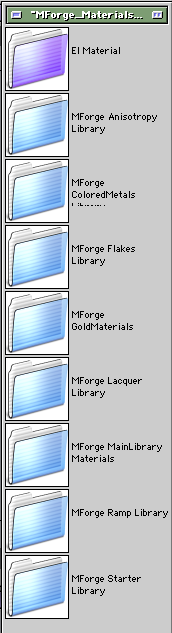
Ola Kbartlez, You have the Sample Projects which are in the EIAS3D Konkeptoine page and there have all kinds of Metals, you need to only to like a group in the specific Master Material. Example: And you can copy the Mforge Materials folder which you can find in the same EIAS3D Konkeptoine web page and drag to your EIAS 8 folder and place inside the EI Material folder, the when you open EIAS 8 and open the Materials Palette window, you will have several options to drag in your groups and render. Take a look: Fred Kuntz did a render of lots of Mforge materials if you need a guide: http://www.artimatio.../MForgePresets/ Feel free to message me Thanks Tom

-
Ola, Take a look: http://moi3d.com/download.htm Thanks Tom
-
Ola Kbartlez, Thanks for the tip! Please, upload a simple sample model in FAC file format exported from VIACAD 7. Thanks Tom
-
Ola Vgd, Thanks a lot for your tip! Tom
-
Ola Ken! No prob, feel free to message me anytime :) Thanks Tom
-
Ola Ken, I always used Mforge :) http://www.eias3d.com/products/konkeptoine-plugins/mforge/ It have sample projects with tons of possible materials, Fred Kuntz did a catalogue list here: http://www.artimation.com/MForgePresets/ EIAS 9 have other flavors :) Hope that helps!! Thanks Tom
-
Ola Brian, Yes, you are correct, we did a hard work on Rama 9!!! Thanks Tom
-
Ola Eiuseas, Please, unzip this file and place the SuperPro32 Dongle driver on this path. /Library/Frameworks/ Thanks Tom SuperPro32.zip
-
Ola David! Thanks for your tip, btw: I never saw this problem, but now we have even more info! Thanks Tom
-
Ola David, Please, show me your crash report, some driver is missing. Thanks Tom
-
Ola Juanxer, Only a detail, Joe already was having some of your problems with Rama, which I already answered: Thanks Tom
-
Ola Juanxer, You dont know How we want to release it asap, we are solving a complex detail now, to give you some light, we had a serious and hard work on Rama to make it robust. We are doing our best to make your and our user base life easier and better! I know you want to use EIAS 9 right now! Thanks Tom