Tomas Egger
-
Posts
3517 -
Joined
-
Last visited
-
Days Won
20
Content Type
Profiles
Forums
Events
Everything posted by Tomas Egger
-
Ola Steven, In reality, you can improve the GI sizzle in the couch increasing the Color Tolerance (GI window) from 1.0 to something like 3.0. Thanks Tom
-
Ola Juanxer, Playstation 3 engine.. using the Face Capture technology. Really cool!! Thanks Tom
-
Ola Michael!! Really nice, I cant see all the details due the Youtube compression, please, create a Vimeo.com page too, there you can post a better quality :) Thanks Tom
-

Turbulence, new and interesting fluid dynamics...
Tomas Egger replied to FelixCat's topic in EIAS General Forum
Ola, After release, we can talk and brainstorm a lot. Thanks Tom -
Ola Kurt, I will watch it soon.. Thanks for the tip! Tom
-
Ola Brian!! We totally understand you, I cant share our plans with you right now, but after EIAS 9, we will talk about future and we pay attention on this theme. believe me. Thanks Tom
-
Ola Steven, I liked your PDF.. lets release 9 first.. then we can think more! Thanks Tom
-
Ola Scott, We are taking more time than we wanted in our last optimization.. Thanks Tom
-
Ola Maher, In reality Camera doesnt render what it doesnt see, it have this kind of optimization, but Camera or any 3d render to do a proper GI calculation, it need to load everything in RAM. But that was Camera 8, lets see what Camera 9 will bring to us. Thanks Tom
-
problem to import morph target from Poser
Tomas Egger replied to andygraph's topic in EIAS General Forum
Ola Andy! Solved? Thanks Tom -
Ola Michael, Good to know! Why not use textures from internet to replicate your shaders? instead of render from all views to place them.. I use these these kind of textures, or I scan real materials or I took digital Camera photos. http://www.cgtextures.com/ Thanks Tom
-
Ola, Looking Michael, project, I changed these settings: Anti-aliasing level - 4x4 Sampling level - 1x1 GI Primary Rays - 200 GI Sampling Area - 8x8 Area Light Primary Rays - 200 (for all 4 lights) I added optimization in all lights, adding each light reference size in the optimization box: I added Motion Vector Blur on all groups, to let the animation more soft. 2 Tips for faster renders looking your project: - Turn OFF receive shadows (group info window) in all groups with any kind of glass material. - In animations, I never use procedural shaders, only bit maps textures, for diffuse, bump, anything.. (the animation FLICK in any kind of 3d application) and they slow down a lot the renders, please, turn OFF in the render window, the shader check box and do a test render, you will speed up the render several minutes. Sure, I tested your scene with EIAS 9 Camera, I will not tell you the result, let you play with it when we deliver, you will see what Im talking about. Thanks Tom
-
Ola Alex! Awesome my friend :) Thanks Tom
-
problem to import morph target from Poser
Tomas Egger replied to andygraph's topic in EIAS General Forum
Ola Andy! Please, send me both exported files from Poser, tom@eias3d.com Btw: you forgot to attach the image. Thanks Tom -
Turbulence, new and interesting fluid dynamics...
Tomas Egger replied to FelixCat's topic in EIAS General Forum
Ola, Interesting link Felix! Thanks Tom -
Ola Michael, Could you send to me this project? let me look it? and Im curious to see EIAS 9 render time too. Thanks Tom
-
Ola Aziz, Yes, Im interested on it for sure in the future. Thanks Tom
-
Ola Kurt! Sure, Its a pleasure to do the new music video clip with our new EIAS 9 baby :) Im anxious to share EIAS 9 with all our friends here. Thanks Tom
-
Ola Alex!! Awesome Renders :) and tests! Thanks Tom
-
Ola Kurt! I saw all, Really cool! they are totally Huge and complex.. !! After years, Im starting a new music video clip, lets see what will happen :) Thanks Tom
-
Ola Aziz, Never saw it, totally cool, ILM did a production rig like this for Jurassic Park (they won a Oscar because of this :)), so, Phil Tippet could animate the Dinosaurs rigs and the render was done in CGI :) Take a look!! Markerless Motion Capture: http://www.ipisoft.com/ Thanks Tom
-
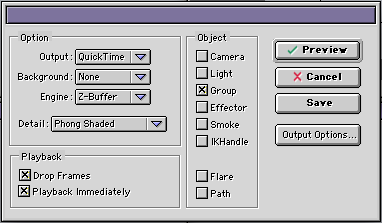
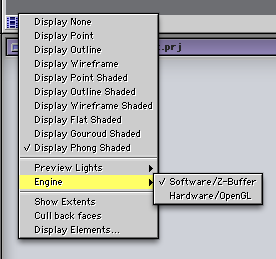
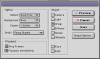
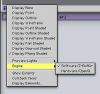
Ola Michael! What is a realistic resolution for high quality animation? Its a subjective answer :) In Brazil we still in SD format (720x486), we several times render the double in square pixel (1440x1080) to achieve better AA reducing the size. As Alex wrote, all the formats are correct.What is a realistic target rendering time per frame for high quality animation? Everything will depend of your complexity in the scene and optimization, I did tons of tricks in my life with EIAS, I can teach all.Do I need to be really focused on reducing number of polygons in my scenes? As Alex wrote, yes, your focus was in the “stills†market, in Animation, a lot of more things are in motion, so, you will loose a lot of details when Camera moves.How can I reduce number of polygons but retain a high quality result? Optimized meshes are always good, keeping bevels and details in the edges and reducing polygons in a flat area, example: if you want to have cube and it doesn't need to have bevels, why it need to have more than 6 faces?Is Final Cut Express HD the right application for what I am trying to produce? I use at home Premiere Pro and they use FInal Cut Pro at Studio, you need to use what you feel more comfortable. [*]How many stages do I need to go through to develop an animation? After I write an idea, I start to block my animations doing a animatic, with simple cubes and low poly objects I can do several Cameras and preview them, really, really fast to see if the Cameras are working and its amazing fast editing, the Camera position, rotations and velocity curves. Then, I start to replace the simple blocks with good models, add textures, lights and so on. This will make your workflow amazingly easier. [*]How do I create fast previews when the "Preview" function doesn't seem to be able to control frames per second output? Open Render window and change the render pop-up from Raytrace to Phong, this will force Camera render even faster. [*]How do I even use the "Camera View" window with the "Preview" function if the "Camera View" window doesn't seem to function properly? My scene is often all black or parts of the model is turned inside out. I don't have Cull Back Faces turned on. I am using ArchiCAD and perhaps there is a better work flow for importing so I can effectively use the hardware rendering engine. I have played with Perspective Clip but it just seems to end up a mess. I can email a Preview so you can see what is happening. - As Alex wrote, change in the Illumination list to Camera only and change to software / Z-buffer preview. - Turn off cull back faces as you did. - Control Key pressed + Mouse click in the preview button, use Z-Buffer engine, Quicktime (in the output options, choose H264), Enable Drop frames and Playback Immediately (if the output is screen) and detail Phong Shaded. [*]I seem to have this funny thing happening where if I have selected something my "Camera View" window goes black but when I deselect the item the window restores to the lighting set selected for the "Preview Lights". In the Camera viewport? Use in the Illumination list to Camera only and change to software / Z-buffer preview. Maybe is a bad model which you are crossing or in the preferences you “depth†is too small. Maybe I just need to work through all the bugs I seem to have to give me a better chance at developing a workflow that increases efficiency and decreases the level of impatience. You are starting a new field, with lots of questions and a few answers and clients are always pressuring you, so, its normal to feel frustrated! We are here to help and show our workflow! Hope that helps a bit! to start! Thanks Tom
-
Ola Michael, You know How Im fan of your work :) To jump in the animations field for you is a natural step. Yes, 3D animations are slower when we use the latest lighting tools and bigger render sizes. Ok, EIAS 8 render have a 32 bits limit and singe core limit, which means, we can assign only 2GB of Ram, today, with render sizes like 1920x1080 + GI + Photons is complex. We bought EIAS, because we want to make it modern and ready to artists do the animation they want in the render size they want and more.. Right now: after studying so much EIAS all long these years, I can explain whats happening and what can be done for you before EIAS 9 release, which is receiving a lot of care to allow you and the user base do exactly what you are asking right now. Since I work with Tv advertising films and music video clips, I can explain you all my tricks :) Ok, what are the secrets, who's been hiding them from me all this time and how do I purchase them or get them? You dont need to purchase it, I can answer you! I have done a lot of animations but I guess my problem is what is a realistic production time for a given quality of video. What is too long a rendering time, per frame? Is Final Cut Express HD my problem? Is wanting a rendered resolution of HD (1920x1080) why I'm feeling frustrated? Should I choose a lower resolution with better anti-aliasing? - As I wrote, Camera 8 have limits, so, I always used tricks like: If I have internal / external scene, I can disable everything which my rendered virtual Camera is not looking, otherwise, Camera 8 will compute all polygons with GI and Photons (when I use them), pure Skylight (GI) is fast, but Photons produce more realistic images as you know, but if you are trying to render in HD (1920x1080) with huge number of polys, probably Camera we will see the limit fast. - I always render using 24fps, Are you in Australia, right? probably you need 25fps? (less frames to render and preserve the strobe look of cinema) - A few users notice that Renderama 8 sometimes shows a annoying bug which randomly change the order of a few frames in a stitched animation or crash in the end of batch list render. (all fixed in EIAS 9), maybe your jump is something like this? the workaround right now is render directly from Local Camera in each machine several parts and edit all pieces later. Please, explain me better your problems step by step. Thanks Tom
-
Ola, I see the same.. let me add in the Bug list. Edit: Just posted on our Bug Tracker: http://www.eias3d.co...random-streaks/ Thanks Tom
-
Ola Joe! I will be waiting your file.. Thanks Tom