Tomas Egger
-
Posts
3517 -
Joined
-
Last visited
-
Days Won
20
Content Type
Profiles
Forums
Events
Everything posted by Tomas Egger
-

Which plugins have been updated to 64bit to date?
Tomas Egger replied to bbuxton's topic in EIAS Plug-ins and Shaders
Ola Bbuxton! We are working right now on our supported Konk 64 bits tools. The tools included in EIAS 9 release are totally 64. Thanks Tom -
Ola James! Awesome render times!! I need to post mine too :) Thanks Tom
-
Ola Frankg, Ahh, its interesting, its crashing for me, but I have both. Thanks Tom
-
Ola, New post :) CG Society Thanks Tom
-
Ola Scott, Camera 9 using all 8 cores will not make Camera 9 run 8 times faster, even Camera 8 with 8 slaves cant be 8 faster.. Answering: You need only to make your 8 slave folders like before, go to Camera 9 settings and type 1 thread only, so, each Camera will use only 1 core, you will have 8 Camera 9 using 1 core each. Hope that helps. Thanks Tom
-
Ola Frank, Good catch: http://www.eias3d.co...c-crash-camera/ Always try to simplify the project as much as possible with low settings, so, we can reproduce it faster :) Thanks Tom Proj Attached: Files.zip
-
Ola Frankg, Please, send me a simple sample project showing the problem: tom@eias3d.com Thanks Tom
-
Ola Felix! It accepts Maps.. I will try to do a sample project asap for you. Thanks Tom
-
Ola, Hans Groothuis just posted a new Benchmark Project! Time add your render times :) http://eias.groothuis.com/index.php Thanks Tom
-
Ola Aziz, Camera was running in 32 bits mode, 2GB of Rama, which it expended 170MB to render a 1024x1024 :) Hope that helps Thanks Tom
-
Ola Maher, When you run EIAS 9, go to menu bar / Help / Animator manual. The tweaks are really simple in EIAS 9, if you want post a simple EIAS 8 project, I will be glad to show what to do :) Thanks Tom
-
EIAS 9 & Free Dutch Skies 360° It took a long time but the speed render demon EIAS finally released his new version v9! Made a exclusive sIBL/HDR set for them + some extra BG plates…. and its free! You are are allowed to use it commercially. You can download it here. Ps if you need the original RAW files of the extra BG plates just mail me. In the case you not know it already EIAS v9 can import sIBL sets directly! bobgroothuis.com link - Read More
-
- 2
-

-
Ola Rich! Thanks a lot! Time to make EIAS more and more modern, faster, easier and robust :) Thanks Tom
-
Ola Maher, “Thomas, does that mean that with a render farm, you only need to add in Renderama one render engine per remote host and the camera on that host will use all the available core/thread on that host? That will be really great, since with the new accumulation of multicore CPU it is tedious and annoying job just launching in Renderama all those remote engine and on the remote launching all the remote slaves and organizing all the different render windows...†Exactly, totally easier, modern, faster and stable :) Thanks Tom
-
Ola Scott, Now, with EIAS 9, I only use one Camera in my machine which see all my 8 cores, it doesnt need 8 slave folders anymore, thats it. Thanks Tom
-
Ola, Architosh.com just posted about us :) Thanks Tom
-
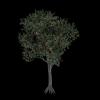
Ola, To understand one of our really complex optimization on EIAS 9, lets see this simple example: X-Frog Tree Project A GI render with lots of clipping maps: EIAS 8 render: 59 min 43 secs using one core EIAS 9 render: 1 min 31 secs using one core (40 times faster) EIAS 9 render: 21 secs using 4 cores (8 threads) i7 Mac Book Pro (120 times faster) Thanks Tom
-
Ola BB, This render is using Speed Tree: http://www.eias3d.com/wp-content/uploads/2012/11/Speed-Tree.jpg But a direct connection is interesting :) Thanks Tom
-
Ola Bwcc, He means to show the outline, which was “broke†because the OSX Lion. Thanks Tom
-
Ola Scott, 1) Please, download the EIAS 9 Demo and open Camera settings, you choose between 32 and 64, if you dont want to change between both to get faster renders sometimes, you can leave in 64 bits mode, the render time is small between both 32/64 with small scenes. 2) Rama is always needed if you have a renderfarm with several machines or if you have a render batch of projects to render while you rest a bit :) Camera 9 will push hard to use all cores and in all render process. 3) Realflow import is addressed in our list of interest. Download the samples and render: http://www.eias3d.com/tutorials/ Thanks Tom
-
Ola Dan, XP works fine with EIAS 9, about Rodeo, works, fine, but now we have Bullet which is fully integrated with Animator, works tons of times faster and works with thousands of groups, works with forces, constrains, bones.. AI / EPS was added to work with Mrs Bebel at first step. Hope you like it. Thanks Tom
-
Ola bwcc, Camera 64 is only used when Camera 32 cant handle the amount of data, in my experience, when I did huge renders with tons of Maps, the new Camera 64 can load everything in the Ram :) Thanks Tom
-
Ola Felix! Thanks my friend, more and more robust, modern and fast features are the goal. Thanks Tom
-
Ola Steven, Im glad you like it. You can render now in frames, using PNG and TGA, no limits. Download Photons Lessons: http://www.eias3d.com/tutorials/ Any doubt, I can explain, but its really, really easier now. Thanks Tom
-
Ola BW, We took care of this error on Camera 9, sometimes, it still appears on Animator on specific setting, we will look further on it. Thanks Tom