Tomas Egger
-
Posts
3517 -
Joined
-
Last visited
-
Days Won
20
Content Type
Profiles
Forums
Events
Everything posted by Tomas Egger
-
Ola Mickael, I like too, since we re-designed the butterfly on our new logo, I will like to use the slogan.. ;) Thanks Tom
-
Ola Brian, Let me ask Igors. Thanks Tom
-
Ola Luca, Please, post a screen grab from your Area light tab, photons tab and GI window. It's better to see what's happening. Which time are you having now per frame? Thanksss Tom
-
Ola Ross, Soo beautiful!!! Terrific.. Thanks Tom
-
Ola Alex, Wonderful work my friend!! I will talk with you soon.. Thanks Tom
-

EASY BASIC EI PART 12.13.14.15.16.
Tomas Egger replied to Mark Johnston's topic in EIAS General Forum
Ola Mark, All Video Tutorials posted!!! Thanks Tom -
Ola Paul, http://en.wikipedia.org/wiki/Mac_OS_X_Snow_Leopard Only Snow don't support G5 any more. I will take a look in my studio, we have a G5 there. Thanks Tom
-
Team up with Newercenter Silo modeler again?
Tomas Egger replied to joseph56's topic in Features propositions / Ideas
Ola Joseph, Totally true, time to make it better & better!!! Thanks Tom -
Ola my friends, News from Matt Hoffman â€A Universal Binary application will run on the G5 if the version of the OS is recent.†Thanks Tom
-
Ola Paul, This is the info I received from Matt, I will need to re-check. Thanks Tom
-
Ola Chip, Thank you very much!!! Tom
-
Team up with Newercenter Silo modeler again?
Tomas Egger replied to joseph56's topic in Features propositions / Ideas
Ola Mickael, Good you found the way to export from Silo and import in EIAS. Thanks Tom -
Team up with Newercenter Silo modeler again?
Tomas Egger replied to joseph56's topic in Features propositions / Ideas
Ola Mickael, Send me your model, let me test here.. :) About Import and Export, this is really important.. we started with MDD and we want to take care of this theme. Thanks Tom -
Ola Mickael, We are in discussions about the plug-ins. :) Cross your fingers.. :) Thanks Tom
-
Ola CJ, Welcome back... You deserved the vacation my friend. Thanks Tom
-
Ola Brian, Great its working and its better.. its our goal. You will need to contact Dante’s developer... :) Thanks Tom
-
Ola Brian, Could you test this new build and inform us? Thanks Tom MrsBebel.plm.zip
-
Ola Michael, If am I not wrong, he is beta testing it.. please, contact him directly: Toby Thain Thanks Tom
-
Ola Mike, Are running on a Mac Intel or a PPC? EIAS 8 only runs on MacIntel Machines and Windows boxes. Which OSX? Thanks Tom
-
Ola Michael, Please, go to your EIAS 8 folder / EI Resources Folder / And delete your dongle data file, appears like EIASKeyXXXX, XXXX will be your dongle number. Try to use your authorization code again. Thanks Tom
-
Ola Apu, Placer works fine, you can instance any kind of groups, a short or a long polygon “like a hairâ€, but long Hairs, need to be really well planned, because Placer was not created to be a “Hair†system, its a instance system. Place have controls of size, rotation, direction and placement, all based in painted weight maps, colors can be controlled by the maps applied on the “head†of your character or based in textures or shaders applied on your “fur†or â€hair†instance. Please, fill Northernlights3d form and go to download area, then get the Placer Deposit manual, take a look, its always important to see the manual before buy your tool. http://www.northernlights3d.com/Downloads/download_entry.html Thanks Tom
-
Team up with Newercenter Silo modeler again?
Tomas Egger replied to joseph56's topic in Features propositions / Ideas
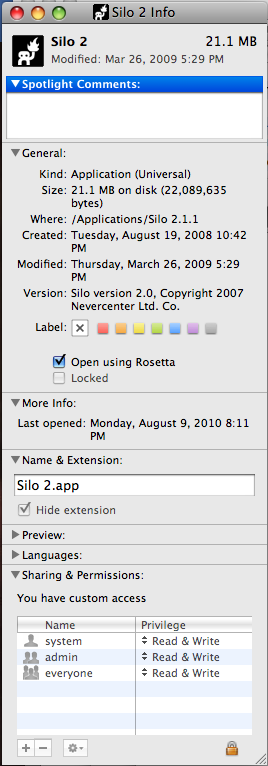
Ola my friends, Dont forget, if you enable in the Get Info of Silo, “Open using Rosettaâ€, it will export .fac correctly. Thanksss Tom
-
Ola Apu, please, look my answer in this post, I did with Placer Deposit.. http://www.eias3d.com/forums/showthread.php?tid=322&highlight=Mouse Thanksss Tom
-
Hey Michael, I would like to replace your new render in our web site.. Could you add the credits in the image to me like you did in the render challenge? Thanks Tom
-
Hey Michael, More and more real.. Thanksss Tom