Tomas Egger
-
Posts
3517 -
Joined
-
Last visited
-
Days Won
20
Content Type
Profiles
Forums
Events
Everything posted by Tomas Egger
-
Ola Alex, Lets wait to see if we find some prb before you re-install everything.. Thanks Tom
-
Hey Yhloon, Wonderful!!!, Big Brain.. :) Do you have the link of this free application to share with us? Why you not try to add a Rig and do some animation tests just for fun? Thanks Tom
-
Ola Felixxxxx!!!! I will take a look at them.. Im with you!!! Go Germans!!! Thanks Tom
-
Ola Felix, I just deleted Army.jpg from FTP Root.. I saw your Army.jpg inside your folder also (I likedddd) .. Is it working? A good game will be Argentina against Germans. Thanksss Tom
-
Ola Bill, Really Beautiful use of Sim Cloth Thanksss Tom
-
Ola Felix, Just created a folder to you “FelixCatâ€, Did you upload any image already? sorry for chile team.. :( Thanksss Tom
-
Ola Alex, Congrats about German.. :) Hey, Maybe when Internet break the connection, Renderama loose the connection with slaves? Could you do a favor? try to re-render your prj like you did, but after a machine restart. Msg me.. Thanksss Tom
-
Hey Hans, We will take a look soon on Rama related issues, I will msg you. Thanksss Tom
-
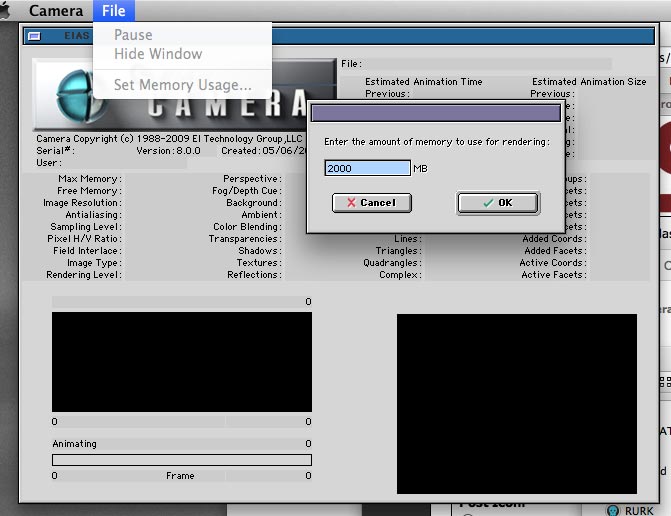
Ola Anthony, How much RAM is allocated to Camera? 1) Delete .ccn file inside EIAS 8 folder 2) Double click Camera application to open it 3) Menu Bar / File / Set Memory Usage 4) Camera 8 allow you to have 2GB at maximum So, you can run 2 Cameras using Renderama in the same time to emulate a Multiprocessor render. If you already did the correct allocation of memory, please, post more info about your project. Thankss Tom
-

Encage cannot verify copy protection.
Tomas Egger replied to RobK's topic in EIAS Plug-ins and Shaders
Ola Rob, Let me contact Igors, :) We are here to help.. Thanks Tom -
Ola, Congrats Mark.. :) Thanksss Tom
-
Ola Mark, Probably your model have normals inverted.. If you want, send to me.. I will take a look.. Thankssss Tom
-
Ola Mark, Great, you solved the problem.. msg me if you need more help.. Thanksss Tom
-
Ola Derryl, Sorry for my delayed answer, I will take a look closer tomorrow.. Thanksss Tom
-
Ola Michael, Thank you my friend, we can look lots of areas of EIAS to future developments.. Thanks Tom
-
Ola Michael, Time consuming? Render time or set up? Thanksss Tom
-
Ola Michael, Good to test these projects.. maybe you find some bug, msg us. Thanksss Tom
-
Ola Michael, Did you try smoke together? Probably can add more realism.. :) Thanksss Tom
-
Hey Michael, Glow version is reallly great!!!! Post later to user learn How you did it.. Thanksss Tom
-
Ola Toshi, Really Really wonderfulllll Thanksss Tom
-
Ola AVT, I really like 1 sec renders... :) Try it with GI now.. Primary 200 rays - Sky Light with 0.55 And your Spot Light... :) Thanksss Tom
-
Ola AVT, Great Model... Im interested in render time and Poly count too.. :) Happy Birthday... :) Thanksss Tom
-
Ola Michael, Awesome, I would like to see the project file also.. Thanksss Tom
-
Ola, Its a pleasure... Thanksss Tom
-
Ola my friend, Bug fixed... and new build uploaded. http://www.eias3d.com/forums/showthread.php?tid=174&pid=1550#pid1550 Thanksss Tom