RichardJoly
-
Posts
500 -
Joined
-
Last visited
Content Type
Profiles
Forums
Events
Everything posted by RichardJoly
-
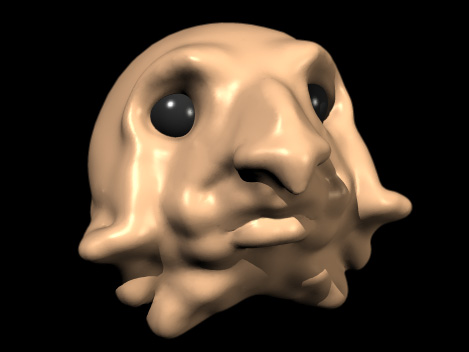
Sculptris is now available for OSX... http://www.pixologic.com/sculptris/ You can also find it for PC and Mac on the September issue of 3D World Magazine (#146) along with a 45 minutes tutorial. Saves as Obj. As you see, no effort made with model... Just a blob to check Obj export.
-
Curtains, tables and chairs already makes this place huge! Love the lighting! It's getting better and better, congrats!
-
Yes!
-
http://www.telegraphics.com.au/sw/product/eicomponent http://www.telegraphics.com.au/sw/product/EIFormat
-
GREAT News! And nice improvement in the overall appearance! The little icons at the top menu line disappeared... I'm sure they'll be back after a couple days off...!
-
EXR2mesh comes to mind... http://www.eias3d.com/forums/showthread.php?tid=24&page=1&highlight=EXR2mesh EXR2mesh will create actual geometry. When bump maps don't cut it, don't forget about displacement or normal maps. They often add the little extra needed.
-
Nige is right. That would be your best bet. At 99$ ViaCAD is a must have tool. Importing .stp and .step is the reason why I bought it years ago.
-
Hi Victor, Check these out... http://www.axyz-design.com/index.php http://www.evermotion.org/modelshop/show_product/female-04-3dpeople-vol-01/184/0/0/
-
It exports to Maya and 3DStudio Max.
-
Argand lamps are a must of course... I had to look it up you know:huh: My knowledge of oil lamps was limited to the one I use during power failures... ( it has a cylindrical wick...) Nice work Richard. The furniture will establish the size of the building. The lighting is improving with every new post, your persistence is commendable!
-

Lion Compatibility - Loaded Question(s)
RichardJoly replied to Gigayoda's topic in EIAS General Forum
In 10.6 (Snow Leopard) holding ⌘⇧. (Cmd-Shift-Period) in an Open or Save window will toggle access to hidden files and folders. -
the suggestion was made. http://www.eias3d.com/forums/showthread.php?tid=805
-
Thingmaker suggested adding a folder for permanent images when the option "Make image permanent" is chosen in the preferences. Now these images are simply put in the Home Directory of EIAS. http://www.eias3d.com/forums/showthread.php?tid=802&pid=4127#pid4127
-
That is how it's supposed to be Derryl. "EI Snapshots. This folder is used to hold any snapshot renderings that you create during a session with the program. Once you exit the program, the snapshots in this folder will be deleted, freeing up disk space. If you wish to keep your snapshot renderings, you will need to set the preference. Choose Edit>Preferences>Preview & Render tab, snapshot section, and enable the Make Image Permanent check box. If this check box is enabled, snapshot images are then placed within the home directory of EIAS Animator, and not within the EI Snapshots directory."
-
Nice! I checked with one of my wife's bracelet to check the breaking speed and the final oscillation and yes, the bracelet looks real enough. You could have the hand keep a slight movement at the wrist with simple deform and rotation to get a more realistic overall effect.
-
Scarrrry Carlos! Nice integration! Did the cameraman survived?:P
-
Hello Apu, Could you tell me the size, kind and codec of the movie you're trying to upload? Could you post it on Vimeo? If nothing works, contact me via email.
-
Great job Jason! I love those breakdowns, it kind of emphasize the magic of the shot.
-
Depending of the accuracy needed, you could achieve the effect with deforms and bump maps. Here is a project of an attempted de-crumpling... http://www.rdnmultimedia.com/eias/crumpled.mov Project: http://www.rdnmultimedia.com/eias/crumpled_paper.zip
-
Oh gees... My son calls me "Ye Old One" Young like us is quite refreshing...! Old and wise is the music clip from Alan Parson used in the title... I'm a fan...
-
Really an inspiring Demo Reel. Great work! He is a Master... but is he Old and wise?:P
-
Have you tried opening it with a text editor and look inside the file? You might have some clues in there that could help pinpoint the problem. That's a mighty large file, is it sitting anywhere we can download it?
-
As Tom suggested, try rendering at a small size. I would try a Phong render at 640X324 without GI (of course) antialiasing off and no shadow. That is quite a simple task for EIAS and will help pinpoint the problem. How did you check a specific group is not the problem?
-
2000 degrees??? I often have to use large shutter angle to achieve the desired effect. A shutter with an angle larger than 360 degrees would amount to no shutter at all... Technically we would need just enough steel left on the shutter to cover the displacement from one frame to the other. An angle over 330 degrees is highly improbable. So we are talking of a different beast here with numbers often around 400 and in this case 2000. Shouldn't we rename this field to blurriness instead of shutter angle?
-
Very nice Victor! By showing different sections, you keep the attention of the viewer. The moving 3D people is a nice addition. The music is dynamic and perfect for the presentation. I really enjoyed the visit...! There is a little thing that nags me... In the beginning at around 5 sec, when the Central drops in place, we can see appear in place before the drop is finished... Nicely done, congrats!