Tomas Egger
-
Posts
3517 -
Joined
-
Last visited
-
Days Won
20
Content Type
Profiles
Forums
Events
Everything posted by Tomas Egger
-
Ola Al, Please, send me this project, I just tested here, I dont see the Zero % problem as you reported using EIAS 9. Thanks Tom
-
Ola Mark, I need to ask Matt, since we dont own EIM, hope he can help. my email, send your dongle number: tom@eias3d.com Thanks Tom
-

writing img files from Aftereffets CS6 ?
Tomas Egger replied to rodlord's topic in EIAS General Forum
Ola Rod and Scott, Please, download here, you can have both quicktimes apps, I have both, I wrote about 10.6.8 and 10.7.5, because Im running these OS in this particular machine. http://support.apple.com/kb/DL923?viewlocale=en_US&locale=en_US Scott, Adobe removed several output formats, including XSI and several others, the Adobe team messaged me. Thanks Tom -
Ola Reuben!! Awesome!!!! Thanks Tom
-
writing img files from Aftereffets CS6 ?
Tomas Egger replied to rodlord's topic in EIAS General Forum
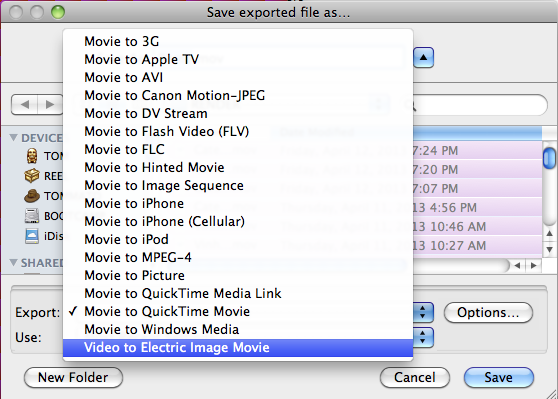
Ola Aziz, Thanks for you answer, Please, use Quicktime 7.6.6 Pro EIComponentUB.component OSX 10.6.8 and OSX 10.7.5 - Drag that to your HD/Library/Quicktime You will have the Import and export option including EI file format. Thanks Tom
-
Ola, We will take a look.. Thanks Tom
-
ray trace transparency with alpha.
Tomas Egger replied to bwcc's topic in Features propositions / Ideas
Ola Brian, We've some ideas, but anyway it will be not "just alpha channel". There is "transparency" layer in EI_Layers shader, Can it be used to create "RT masks", like in attached prj? If not please tell us what's not enough. Thanks Tom & Igors TransProject.zip -
writing img files from Aftereffets CS6 ?
Tomas Egger replied to rodlord's topic in EIAS General Forum
Ola Rod, Get it here: http://telegraphics.com.au/sw/product/eicomponent Thanks Tom -
Ola Al, I will test it, Could you send me a really simple sample project which produce a wrong .img fps when imported in After Effects? And another for the TGA problem? Send me, please: tom@eias3d.com Thanks Tom
-
writing img files from Aftereffets CS6 ?
Tomas Egger replied to rodlord's topic in EIAS General Forum
Ola Scott and Rod, Adobe dropped several file formats in the output rendering. Why you don't use QuickTime PNG? It's lossless, 1/3 of the file size of the QuickTime Animation codec, support Alpha and 32 bits channels. EIAS 9 doesn't have problem with it. If you really need .img, you can export a QuickTime movie from after and convert in the QuickTime app to .img using the EIAS QuickTime plug-in. Hope that helps Thanks Tom -
Ola, You cant directly import a .EIZ file inside After Effects: http://help.adobe.com/en_US/aftereffects/cs/using/WS3878526689cb91655866c1103a9d3c597-7bd9a.html http://forums.cgsociety.org/archive/index.php/t-788653.html Thanks Tom
-
Ola Verb! How are you loading the .eiz file in After Effects, please, explain me step by step. Thanks Tom
-
Ola Brian! Tony sent you the unlock code again. Thanks Tom
-
Ola Joe! Yes, EIAS 9 is not working correctly with actual Dante build, please, drop a message to Blair, he have a already a new 64 bits version, which you could test, see if he allows you to test right now. Thanks Tom
-
Ola, Could you send me a really simple sample project which demonstrate the problem? Thanks Tom
-
ray trace transparency with alpha.
Tomas Egger replied to bwcc's topic in Features propositions / Ideas
Ola Brian! This is not a simple task.. Could you make a really simple sample project to demonstrate what is not aligning? Thanks Tom -
Ola Joe, Hmmm... lets see...! Thanks Tom
-
ray trace transparency with alpha.
Tomas Egger replied to bwcc's topic in Features propositions / Ideas
Ola Brian, Right now, EIAS cant do it directly, you need to render a ray trace pass (beauty pass) + change the Render Mode to Phong and render another pass, but this feature is in our to do list. Thanks Tom -
Ola, It's a common 3d application problem, named "gimbal-lock", the correct way to avoid this is parent the Camera in a Effector and then animate th effector. Thanks Tom
-
Ola Reuben! He is totally busy working in a UK VFX House.. ! Thanks Tom
-
Ola, Work done by Ian! https://vimeo.com/63358947 https://vimeo.com/63358949 Thanks Tom
-
Ola Alex! Awesome! I would like to post it :) Psunami? Did you use a secret 64 bits version?? Thanks Tom
-
Ola Alex, Understood, only to be clear, When you rig in Mixamo and import as .bvh, you can perfectly match, geometry and bones. Thanks Tom
-
Ola Alex! Nice, try to figure out why the finders are inverted :) Thanks Tom
-
Ola, Cool Motion Capture tutorial !! http://blog.mixamo.com/mixamo/electric-image-and-mixamo/ Thanks Tom