Tomas Egger
-
Posts
3517 -
Joined
-
Last visited
-
Days Won
20
Content Type
Profiles
Forums
Events
Everything posted by Tomas Egger
-
Ola Blair, I agree with you, I mean, the only thing not possible is move a unique instance in the viewport. But I always use Placer a lot! Thanks Tom
-
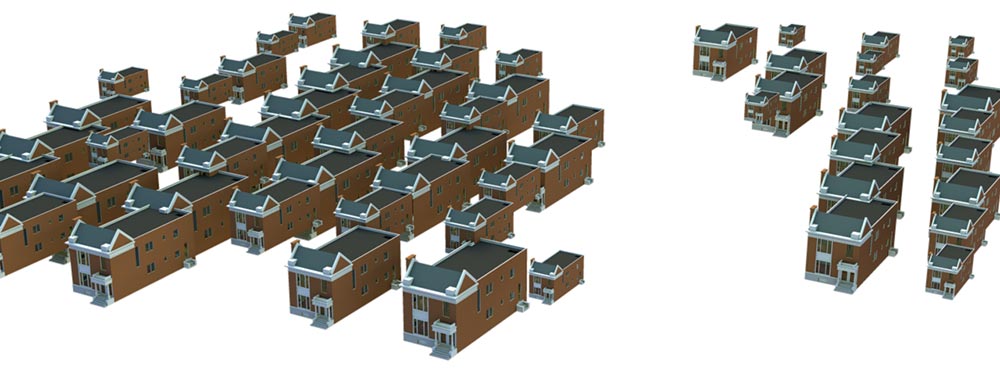
Ola Greg! Here, a Placer_64 bits test with Camera 9.1 - 64 bits, using “weight map†for placement, random sizes and rotations. This house have 173k polys, final scene with almost 5 millions, 1280 x 1024, Old Mac Pro with 8 threads, 7GB ram. Render time, 1min 46secs (GI Skylight + Parallel light + bounced light) Placer Deposit doesnt have individual manual placement, scale and rotation. Thanks Tom
-
Ola, Our FBX library still from 2006 version, thats why you have troubles to import. Autodesk have a FBX converter, a possible test. Thanks Tom
-
Ola Greg, Only a doubt, why you dont exchange the parented Hi-res Tree with a Low res in the Proxy plug-in? it will replace all at render time. You can have a Proxy version with Hi and one with Low. Thanks Tom
-
Hey Greg! Please, send me a proj with only a Hi and a low tree version, let me try. Thanks Tom
-
Hey Greg, Please, explain me the workflow you want :) Thanks Tom
-
Ola Joe! We are working hard here, some new features are already implemented and we have our to do list, we are so in Focus here which made us so quiet... Let's see what will happen now... Thanks Tom
-

problem to import morph target from Poser
Tomas Egger replied to andygraph's topic in EIAS General Forum
Ola Jeran! The principle of the Morphing is have the same number of polys / vertices but the second model need to be re-modeled, otherwise, it will not work. Do you know that? Thanks Tom -
Ola Brian, But if you be able to reproduce the bug, contact me, it's important to fix it. Thanks Tom
-
Ola Brian, Could you repeat the Fbx import and see if it double the world? Thanks Tom
-
Ola Brian! Could you collect and send me the steps to reproduce this problem? Second, try to create a new project and merge this one to see if only one world is imported. Thanks Tom
-
Ola, Try to install Windows 7 64 later, EIAS 9.1 OpenGl, other new features and fixes are a lot better than 9.0 ;) Thanks Tom
-
Ola Joseph, It works only at render time? Thanks Tom
-
Ola Sure!! HERE! https://dl.dropboxusercontent.com/u/10021583/files/EIAS_9_Install_Win.zip Thanks Tom
-
Ola Steven! Two Projects here, one Dome Light (Light Object) and another to cast only the shadow using the same previous project. Right now, its not possible to use generate Shadow Mask in conjunction with GI Sampling engine. Please, open the project and look my settings :) Thanks Tom DOMElight.zip
-
Ola, Note: I tried to reach the developer a few times, no answer from them ever, I like Silo too ;) Thanks Tom
-
Ola Steven! You create a Camera Fog pass and use it to color the depth and a small blur :) Thanks Tom
-
Ola Rich, EIAS 8 will take one hour in your Camera, pay attention in the leafs, they are not clipped with GI. As soon you activate to clip map with GI.. It will slow down a lot ;) Thanks Tom
-
Ola Rich! Are you sure you installed the Demo version? it will not ask a installation code :) EIAS 9.1 Demo Mac Thanks Tom
-
Ola Rich! Cool renderings! Btw: We did optimizations like: Download the FrogBlast Tree render Project EIAS 8 render time using one Camera 59min49secs (Xeon Mac Pro) EIAS 9.1 render time using one Camera (8 threads) 28secs (Xeon Mac Pro) Hope you like it Thanks Tom
-
Ola Maher! My Bad, I forgot to change the dates, it was released in June 25, but I didnt have time to send the release email to our user base. Thanks Tom
-
Ola Rich! It will create inside the Project folder.. do a first render without Rama, then use Rama, otherwise Rama will try to send the phm file, but it doesnt exist yet. Msg me Thanks Tom
-
Hey Rich! Turn off the Parallel light and see if the Light leaks still persist. Why are you not using Photon lights as “permanent†instead of “Always†for final renders, you will have a speed up. Reflections are really optimized in EIAS 9 :) a lot faster ! Thanks Tom
-
Hey Rich, Please, post your GI WIndow and Photon lights setup.. EIAS 9 have a really easier Photons setup and have better GI + Photons + Reflections + amazing speed :) Thanks Tom
-
Ola Steven! Your bug was confirmed: http://www.eias3d.com/forums/tracker/project-4-eias-910/ Thanks Tom