RichardJoly
-
Posts
500 -
Joined
-
Last visited
Content Type
Profiles
Forums
Events
Everything posted by RichardJoly
-
Apu, Part of the problem seems to come from the excessive calculation SimCloth had to make to position the cloth on the arm. You arm was scaled 20.3 times. So every frame SimCloth had to expand the model 20.3 times, calculate the bend from the bone, check the new position of the polygon and position the cloth where it should be... I exported the arm with transformation and the cloth behaved a lot better. It is not perfect but it's a place to start... The cloth is still floating a little over the arm but it could be the cloth resistance. Try different settings to check of it hug the arm better. Cloth_on_arm.mov Project2.zip
-

Global Reflection Vs. Reflection Sky Maps
RichardJoly replied to S. Houtzager's topic in EIAS General Forum
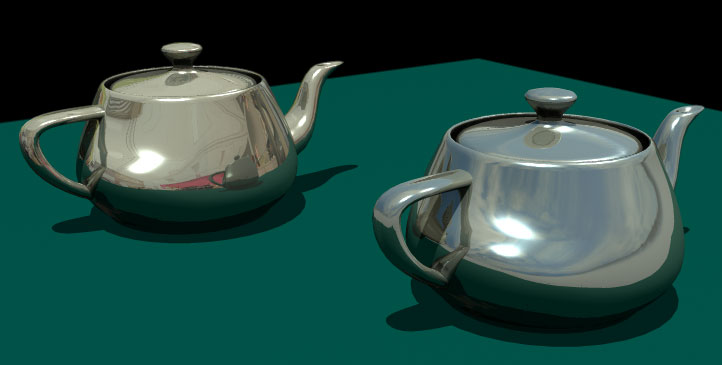
Steven, You did the right thing for the effect you needed. The global reflection map has a on/off checkbox in the material editor that is not individually available for reflection sky map. While in some instance both reflection maps seems to do the same thing, the reflection sky map is a different beast. When using raytrace, it will be used only when a ray hits nothing or the end of raytrace recursions is reached. The images can also be of the normal type (LDR) or High Dynamic Range (HDR). You get much more control with Reflection & Refraction Sky Maps. The way these maps are applied is also different. Please refer to Animator manual on pages 248 to 251 for more info. I have the feeling I'm missing something, hope someone else chips in... Both my teapots have Reflection Sky Maps and Global Reflection but only the right one has the checkbox set to use the Global Reflection map.
-
Very nice! Brings back fond memories...
-
Richard, Min Subframes If this value is greater than 1, Rodeo calculates position of object in between frames to avoid going through a floor for example if in fact it does so between 2 frames. For Rodeo to see what happens inbetween these two frames it needs to calculate subframes. If Rodeo is missing collisions this value must be increased. Default: 10 subframes. Max Subframes Where there are severe object collisions that violate the allowed Penetration and the allowed Link Violations settings, Rodeo will than start to increase the subframes to get a correct solution. This can greatly slow down the simulation. To limit the time to compute the solution Max Subframes impose a maximum number of steps between two frames for the engine. We risk an imperfect simulation by doing this. Increasing the max Subframes value will in general yield better results. CG Solver and Solver Iteration I'm not sure about this one. I think it's the number of repetition the solver will use to attempt a collision detection. As I remember, the CG solver is an alternative solver giving a more exact solutions but might be slower...? Well I hope it shed some light into the dark... Rick
-
WOW! I love the cutaway/transparency move. Nice clean images, very inviting. Excellent camera movement to get to the highlighted part. Congrats! Tailor Tool?
-
I will not be much help here but when you said you trashed the preferences, you trashed the actuals .plist in the library, not the preference folder in the EIAS folder? Have you also reinstalled the Wibu Key? There is no Virus protection software running? I would also try Juanxer fine suggestions.
-
Sweet!:cool:
-
This is one of my favorite Cristóbal's tutorials. He is a master of his art and an excellent teacher and communicator. This little animation was made with his technique: http://www.rdnmultimedia.com/eias/RPC_Trees.mov Here is the collect to get you started: http://www.rdnmultimedia.com/eias/RPC_Trees_Collect.zip
-
Hi Apu, I don't think it's suppose to render correctly only at large size. Would you care to render the image at different resolution and post them if something is wrong? Thank you
-
Anthony, If you send me the model I can try to convert it for you. When you say a Max model, you don't mean 3D Studio Max do you? Obj2fact will only convert .obj models.
-
Steven, You have to export the plugin (SimCloth.plm Group), not the plane. http://www.rdnmultimedia.com/eias/Simcloth_Fix.mov
-
On my MacPro, EIAS V8 and Obj2Fact are running smoothly on Snow Leopard 10.6.4
-
Power Particle Pro: http://www.tripledtools.com/PPPro/PPPro.htm You will see in the examples that it seems to rely heavily on AG_Mondo Clouds for fire and smoke. I don't know if Power Particle Pro can do the same effects without it. http://www.northernlights3d.com/AG_Shaders/agproducts.html If anyone could post an example of PPP fire and smoke not using AG_Monto Clouds that would be great!
-
Apu, Can you export the meshes in 2 different EIAS Projects then merge them together?
-
Congrats on your new toy Joe! I hope you keep gracing us with your magnificent work. I'm away from V8 right now and, like Scott said, post your project with the Ubershape, we'll have a look at it for I don't remember having trouble with it. (Not that I can make it do what I want...) In V8, when you export a group as .fac there is a checkbox at the bottom left of the Export window saying Re-import on export or something like that. It saves a couple mouse clicks... Cheers!
-
:D
-
:)
-
Super model indeed, that's a fact... :rolleyes: Nice job Tomas!
-
Love it!, Great job!
-
This effect, often misused on TV, is perfect for your clip. Could you elaborate a bit on the technical side? Map size, render time, etc. For these shots, I get my map from Nasa's Blue Planet. They have a HUGE one somewhere in there. Andrew Kramer did a tut using AfterEffects that is also quite interesting. http://www.videocopilot.net/tutorials/earth_zoom/ Nicely done Ito, congrats.
-
40$ for ViaCAD 2D/3D today 28 September only
RichardJoly replied to Juanxer's topic in EIAS General Forum
This is very on topic Juan. I just got the email and wanted to share... I own ViaCad 2D3D and suggest everyone to grab it. At 40$ it's a great deal. It export to fact nicely. I modified Jaunxer's thread title so users rapidly see the deal offered for 1 day only. -
Thank you guys. If the simulation looks good at 20 sec, simply put -20 in "start time, s" in the plugin setup window. Also remember that subdivide none gives you a nicer mesh than subdivide 3 steps. I don't think the Flag plugin was ever intended for closeup shots and it is far more slower and complicated to control with a dense mesh. I never tried with Encage nor Dicer. SimCloth can also make nice flags and looks nice at close up.
-
Alex, Answering with humor is great but I fail to see why the information about having the code at hand was put on the forum if no further action was intended.
-
Steven, You could try the free Konkeptoine's Onsen shader. http://www.konkeptoine.com/2free/freestuff.htm
-
Could it be that you enabled Network rendering?