Tomas Egger
-
Posts
3517 -
Joined
-
Last visited
-
Days Won
20
Content Type
Profiles
Forums
Events
Everything posted by Tomas Egger
-
Ola, Take a look: http://www.proviz.info/blog3dfreemodels/3dmodels-ikeafalster http://www.proviz.info/blog3dfreemodels/free3dmodels-ikeaapplaro http://www.proviz.info/blog3dfreemodels/3dmodels-ikeaangso Thanks Tom
-

Modeler 5 launches with one dongle, but not the other ?
Tomas Egger replied to Paul P's topic in EIAS General Forum
Hey Chip! You can't move the KeyTableMacX from the EI Modeler resource folder. Second, EI Modeler is not seeing the Eve3.framework, please, copy it to: HD / Library / Frameworks HD / System / Library / Frameworks See if it works, because the dongle installer should install it, maybe a permission problem in the OSX system. Eve3.framework.zip Thanks Tom -
Hey Joe! If you want to collect the project and send me, I can take a look too. Thanks Tom
-
Modeler 5 launches with one dongle, but not the other ?
Tomas Egger replied to Paul P's topic in EIAS General Forum
Hey Paul! Take a look inside the "resources" folder from EI modeler and move dongle key file to your desktop. Plug the EIAS 6.5 / 8 dongle and try to run the EI modeler. Thanks Tom -
Ola Mondo! I use sometimes too :) Thanks Tom
-
Limitations of the trial version of EIAS?
Tomas Egger replied to maher's topic in General Development and Updates
Ola Maher! There is a educational version, the students need to prove they are in the university / school, they will need to contact us. Have a link in the "buy" page for student licenses. Thanks Tom -
Northern Lights plugin development status update
Tomas Egger replied to Northern Lights's topic in EIAS Plug-ins and Shaders
Ola Hurricane! Right now, the latest installers I have from Blair: https://www.dropbox.com/s/gq1q5ljpeho0php/Northernlights3D_Installers64_bit.zip Thanks Tom -
Ola Michael, Please, take a look in the snap shot you posted, free memory available: 0kb Memory is the issue, options, smaller render size or a lower GI settings, I suggest you a smaller render size to try first. Thanks Tom
-
Ola Joseph! Try this: to scale up (speed down), when you move the keyframes, scale down first with the mouse move and without release the mouse button pressed, move the mouse to scale up (speed down), it will work. Thanks Tom
-
Ola! Please, take a look in this video tutorial: Thanks Tom
-
Ola Mark! Enjoy it! And play a lot with the new features :) Thanks Tom
-
Ola Vislaw! Send me your dongle number and name! I will send your EIAS 8 unlock code. tom@eias3d.com Thanks Tom
-
Ola Chip, My guess, they have firewall enabled in their network, even in the Mac Pro you are using in the company, need to take a look in system preferences / network control panel of your Mac Pro. Thanks Tom
-
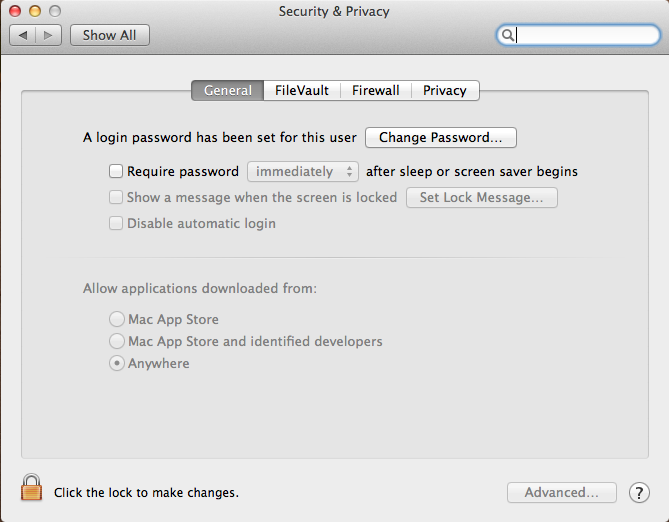
Ola Alpha, This is a new feature of the latest OSX, please, follow the steps: 1) Go to your OSX control panels preferences 2) Change the option: “Allow Applications downloaded from†to “Anywhereâ€. Note: Most Probably you will not have the Mickael problem. Thats it Thanks Tom

-
Ola Joe! It's possible, be aware only, since Camera push your hard drive a lot, if you have all 8 slaves including the local camera to do snap shots, Cameras have a chance to faill because only one hard drive can't handle all. So, the trick to use several slaves at once is have the cameras distributed in a few Hard drives too, internal or external (with fast connections). Thanks Tom
-
Ola! Since you need to export a animated vertex data, You can use the Free Realflow plug-in from Northernlights3D and export a .SD file And open in C4D with the Realflow importer plug-in and apply the hair/feathers. Thanks Tom
-
Ola Brian! These video card options still nebulous for me, I'm planning to buy the D700, to allow me to Study EIAS power with future implementations and other softwares around. I just found this post around on OpenGL forum: http://www.opengl.org/discussion_boards/showthread.php/179404-Can-OpenGL-access-all-the-memory-on-a-single-4GB-VRAM-GPU Thanks Tom
-
Mapping on transparent materials -> question
Tomas Egger replied to fantomaz's topic in EIAS General Forum
Ola Alex! Why you don't render in the passes and compose? one Transparent and another only with the projections? Thanks Tom -
Ola Joe! Only for renderfarm? Maybe the fastest mini macs with 16gb of Ram? They are really cheap! Thanks Tom
-
Ola, Right now, due the limitations of the current EIAS UI framework, it's not possible to use multiple monitors on PC, let's see what will happen in future EIAS upgrade. Thanks Tom
-
Ola Joe! Didn't render it in that format yet, but EIAS 9.1 will be able for sure :) Which is the Aspect and Pixel Ratio? Thanks Tom
-
Ola Scott, You have the Depth Pass in Layer shaders too. Thanks Tom
-
Ola Scott, I always used the Fog pass to use as depth field layer in AE. Thanks Tom
-
Northern Lights plugin development status update
Tomas Egger replied to Northern Lights's topic in EIAS Plug-ins and Shaders
Ola, All Mac builds are updated to 64 bits already. Thanks Tom -
Northern Lights plugin development status update
Tomas Egger replied to Northern Lights's topic in EIAS Plug-ins and Shaders
Ola Mickael! Sent you a email :) Could you send me your previous Mr. Revolver build? tom@eias3d.com Thanks Tom