

Tomas Egger
-
Posts
3517 -
Joined
-
Last visited
-
Days Won
20
Content Type
Profiles
Forums
Events
Everything posted by Tomas Egger
-
Ola Guy! Didn't know the quality of Marvelous cloth simulation, are you using version 3 or 4? Please, do a video tutorial and some High Quality 3d render tests in EIAS with cool light and Anti-Alias? I really would like to post all. Thanks Tom
-
Guy! No problem with English!.. EIAS is a international software :) Doubts, probably you added the Motion Capture inside DAZ, from Mixamo, I suppose? Then you exported as MDD to EIAS, correct? The cloth simulation was done inside DAZ? The Cloths were done in Marvelous Designer, correct? Thanks Tom
-
Ola Frank! Really cool! I liked the dynamics!!! Thanks Tom
-
Ola Guy! Please, do a VIdeo tutorial!!! I will post it. Second, Why you don't use the MDD feature which load all correspondent MDD file to each .obj model? Could you export a animated test from DAZ in the latest FBX file format for me? tom@eias3d.com Thanks a lot Tom
-
Ola! Wonderful test! Thanks Tom
-
Ola Robert! Simply awesome news! Thanks Tom
-

What is the best workflow from SketchUp to EIAS
Tomas Egger replied to Foreveryoung's topic in EIAS General Forum
Ola Burney! Please, don't forget to export the simple scene for me from Sketch Up. Greg, Could you help with this? Thanks Tom -
Ola Michael, My doubt here is: Get this first .obj exported and re-import inside EIAS, see if the UV data still intact, if it's correct, Rhino is messing up the UV. Thanks Tom
-
Ola Michael! When you export the Simcloth group as a .obj, it loose the UV Data? Thanks Tom
-
Ola Greg! Clear! That's was the purpose of the Validate .fact export feature. We really want improve the workflow of our users!!! Thanks Tom
-
Ola Greg! Simply awesome.. I will post them in the Facebook fan page and website! We are really busy with our next upgrade ;) What's means "Validated fact file replacement invaluable."? Thanks Tom
-
What is the best workflow from SketchUp to EIAS
Tomas Egger replied to Foreveryoung's topic in EIAS General Forum
Ola my friends! Please, generate a really simple export in several file formats, so, we can analize and see which we will be possible to update, since several of them will be limited from Sketchup export or limited by the file format itself. Please, send me DXF, OBJ, 3DS, LWO and latest FBX version from it (not 2006)... This simple export need to include the hierarchy, layers, color groups, transparencies... We will need a print screen from Sketchup hierarchy / layers to see if it's matching. Let's see if we can update the workflow. Thanks Tom -
Ola Michael! Exactly.. Thanks Tom
-
Ola Michael! A group with UV space will preserve the deformation intact when the model is used by Simcloth. Thanks Tom
-
Ola Michael! Right now, in the current EIAS 9.1 build, you need to use Autodesk FBX converter to FBX 2006. Thanks Tom
-
Ola, Take a look: http://www.cgchannel.com/2014/08/download-15-free-hi-res-tree-models-in-fbx-format/ Thanks Tom
-
Ola Greg! Its here: Thanks Tom
-
Ola, A friend sent me: http://freespace.virgin.net/robert.bradfilms/TECH.html Never saw this short film!! Thanks Tom
-
Ola Michael, I'm suggesting this approach since you can edit easily the mask if you don't like it and you can render a mask a lot faster than have everything in one pass inside EIAS, this is a compositing trick from film productions. You will use a "traveling matte", I never used Final cut express, but, should be easy to do. Thanks Tom
-
Ola Michael! I would render both, Wood and Gold versions and then animate a version which is only a “Black & White†animated Mask to compose in After Effects, the mask can be done in After Effects too and applied in the groups as textures, Do you understand? Thanks Tom
-
Ola Michael! Could you show us a reference? Thanks Tom
-
HELP! Rendering shadows for PRINT POSTER properly
Tomas Egger replied to supernovavfx's topic in EIAS Artworks
Ola Michael and Scott! Yes, the feature is "frame strip", which tile the render in horizontal "buckets", it allows to render bigger frames. Side note, camera always need to load the entire scene when rendering with GI enabled, no matter the amount of frame strips, since Camera need to compute all Ray traces directions of the scene. Thanks Tom -
HELP! Rendering shadows for PRINT POSTER properly
Tomas Egger replied to supernovavfx's topic in EIAS Artworks
Ola Scott, You need to render using "tile" render, several slices of the same image. Thanks Tom -
HELP! Rendering shadows for PRINT POSTER properly
Tomas Egger replied to supernovavfx's topic in EIAS Artworks
Ola Scott! Please, do a screen grab of your Light settings, like this... Use a Parallel light, turn on Soft Edge Shadow, play with Light Angle and number of Samples. You can turn on and off “Use GI Sampling Engine to see the quality of the shadow vs render time. Thanks Tom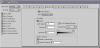
-
HELP! Rendering shadows for PRINT POSTER properly
Tomas Egger replied to supernovavfx's topic in EIAS Artworks
Ola Scott, Please, Could you show us your Shadow settings? Thanks Tom