


Tomas Egger
-
Posts
3514 -
Joined
-
Last visited
-
Days Won
20
Content Type
Profiles
Forums
Events
Everything posted by Tomas Egger
-
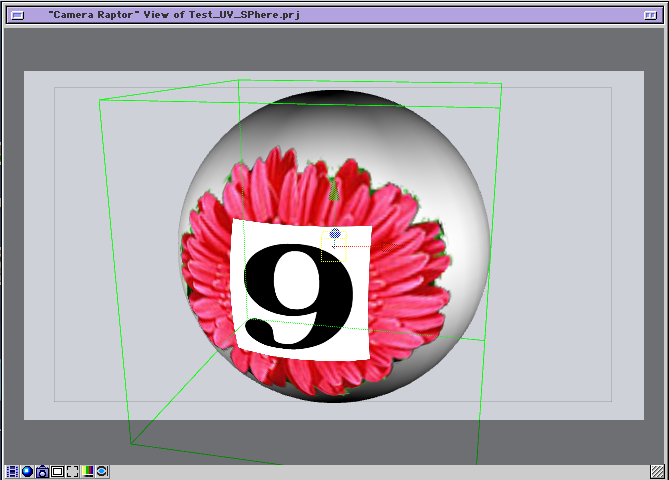
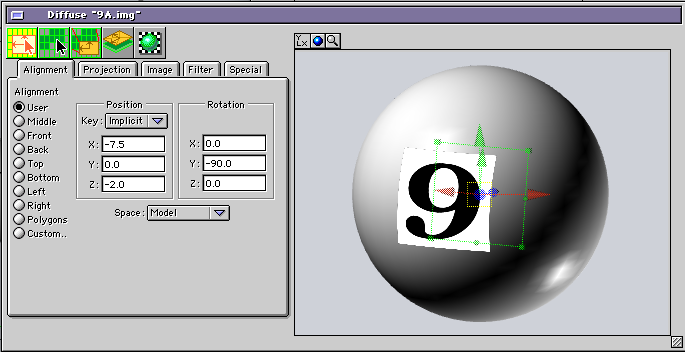
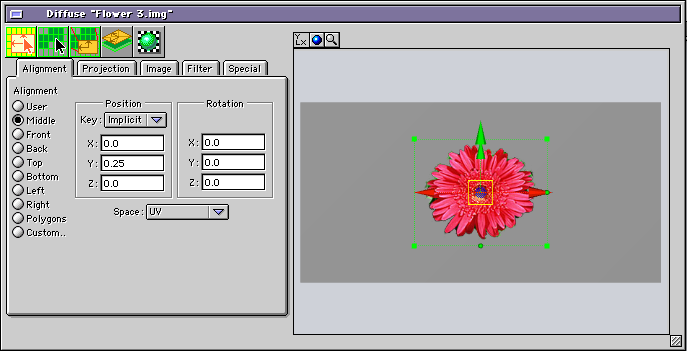
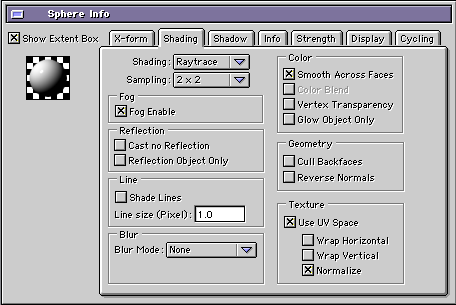
 Ola Jean! Sorry the delay! Its simple, in the group info window, means the geometry will have it "available" for use, if necessary. (Project attached) Test_UV_SPhere.zip So, allow us to mix different types of mapping, here two layer textures, EIAS 9.1 can display up to 8 in the viewports with blend modes and Alphas. 1) Enable Group to use UV. 2) Add two layers for example 3) The bottom layer (Flower 3.img) use UV data space, mode is in UV Space. 4) The top layer (9A.img) use geometry, mode is in Model Space. (Flat, Cylindrical, Spherical..) 5) The result: Thanks! Tom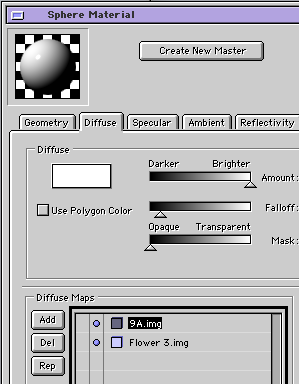
-
Dongle Free Animator | Multicaustics
Tomas Egger replied to Frankg's topic in Features propositions / Ideas
Ola Paul! i understand and I already talked with the FormZ guys, soon or later it will happen with us too. thanks tom -
Dongle Free Animator | Multicaustics
Tomas Egger replied to Frankg's topic in Features propositions / Ideas
Ola Mickael!! thanks for your report, I will appreciate if you get more info! anxious to finish our next upgrade thanks tom -
Dongle Free Animator | Multicaustics
Tomas Egger replied to Frankg's topic in Features propositions / Ideas
Ola Mickael! The adapter is supposed to work..! Thanks Tom -
Ola my friends, This is our New's Year gift for all our friends here, hope you like this new toy :) We are invinting all users to try out the shader!!! Compability: EIAS9 on both platforms (mac/pc) enjoy it!!! Sparkles Shader Mac/PC thankssss EIAS3D team
-
Dongle Free Animator | Multicaustics
Tomas Egger replied to Frankg's topic in Features propositions / Ideas
Ola David and Jean! Our goal is bring the best new tools built-in in EI and don't rely in 3rd party tools.. we are running for that! i know Dongle somehow have Cons, but right now, we can't abandon it ;( thanks tom -
Dongle Free Animator | Multicaustics
Tomas Egger replied to Frankg's topic in Features propositions / Ideas
Ola Jean, Today is so easy to find any app "hacked" in the internet.. Tom -
What is the best way to mix materials, if it is even possible?
Tomas Egger replied to ShaddamIV's topic in EIAS General Forum
Ola Jean! EIAS 9.1 doesn't have fully control of multiple materials per group, you can mask, blends, maps, new reactive maps method, we have plans for solve this issue btw :) Thanks Tom -
Ola Jean! Fully motion capture, the "band" playing I recorded a few years ago for a specific project, but all dance and the troopers dancing I got free on Mixamo.com website ;) its easy to use motion capture on EIAS and it will become easier in the next upgrade ;) Mixamo tutorial Motion capture to keyframes tutorial thanks tom
-
Ola Jean! Here... Sim Cloth thanks tom
-
Ola Jean! Blair is updating his website, but he is fully busy with his robots company.. You can msg him directly.. info@northernlightstactical.com thanks tom
-
Ola Shaddam! We have several ideas for future upgrades ;) thanks tom
-
Ola Steven! good idea :) thanks tom
-
Ola Steven! Well done! Next upgrade will help visualizations like you did ;) btw: how was your render times? thanks tom
-
Ola Shaddam! We really care about users wishes, lets only wait the release, your wish makes sense for us, we took more time than we wanted, because it's our second and most complex update ever ;) thanks tom
-
EIAS 9.1 Demo does not install on Mac OS Sierra 10.12.1
Tomas Egger replied to ShaddamIV's topic in Technical issues
Ola Shaddam! Nice to meet you! Both new OSX and Win 10 have these new privilegies problems, Win need to run everything as administrators.. thanks tom -
Ola Shaddam and Paul!! Hmmm, sounds like a lot of interesting requests!! Let's see what we will have in the next upgrade! We are like crazy here ;) thanks tom
-
EIAS 9.1 Demo does not install on Mac OS Sierra 10.12.1
Tomas Egger replied to ShaddamIV's topic in Technical issues
Ola Shaddam! ita a new OSX security change, several apps are suffering the same problem, the solution: 1) restore the "everywhere" option in the security system. unlock the pad lock, change tô AppleStore and change back to "Everywhere" http://osxdaily.com/2016/09/27/allow-apps-from-anywhere-macos-gatekeeper/ 2) after that download and EIAS 9.1 Demo version and copy to your apps folder, then run camera and Animator, that will solve the "3D icon body" missing, this happen because the new OSX doesn't allow Animator save new preferences. 3) after that install the full EIAS if you have a hardware dongle. the dongle installer which works in the recent systems are here: Dongle installer This recent OSX privilegies problem is solved in the next upgrade. Thanks Tom -
Hey Frank! We will need to check How Affinity Photo API works, you already can render EIAS as .psd sequence files (with layers), .png, .tga.. Thanks Tom
-
EIAS Plugin/Shader update status
Tomas Egger replied to thingmaker's topic in EIAS Plug-ins and Shaders
Ola Alex! Just tested here.. added in simple groups (ubershapes) and the shader is working in 64 bits mode, let only the model you want with the shader and render, probably you found a bug using more complex models. Send me the a simple sample bug project, please. Thanks Tom -
Ola Frank! Yes, since they started the CC cloud updates, lots of problems appeared, the weakest part of AE is the 3D environment for composition for sure. note: I use AE since COSA 1.0 :) Thanks Tom
-
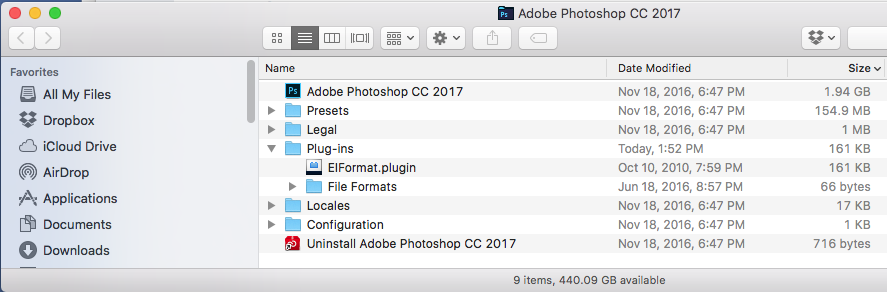
Ola, The new Photoshop CC 2017 after the install doesn't come with Plug-in folder, to solve this, its simple, only create or move the Plug-in folder from an older Photoshop version to CC 2017 and it will work :) Thanks Tom Plug-ins.zip
-
Ola, Contortionist, delete the Socket folder I sent in the zip file, probably is conflicting with yours and open the file again. Thanks Tom Ola, Here, a morph test.. please, look the example: Thanks Tom Morph.zip
-
Ola! You need to export separated all the 3 files and Import only the first one and after that add the morphing target over the imported one, select the final target model. I did another method which can help you, do you have Contortionist from Northernlights? Here the attached project, I did the coil spline in FormZ, imported in EIAS, used contortionist to deform a Ubershape Cylinder and added two deformations, one in the plugin with the same Bezier and another one in Ubershape cylinder to scale when the Coil Squash, Its a another solution which works too :) Play with the parameters, Its a bit exaggerated in the deforms values.. Coil.zip Thanks Tom Coil.mov
-
Ola! Here a simple project using deformations, but if you need a fully realistic deformation, you will need to maintain the volume of the coil spring, my suggestion is a morph, the coil in the both targets, stretched and deformed. Thanks Tom Coil.zip
