

S. Houtzager
-
Posts
469 -
Joined
-
Last visited
Content Type
Profiles
Forums
Events
Everything posted by S. Houtzager
-

Architectural Animation - Shine On Brightwater
S. Houtzager replied to Buggsy's topic in EIAS Artworks
Like the camera lense view shifting that is going on in the first 2 outdoor images, maybe in the interior shots as well. -
Tomas! What is the trick to downloading those, what browser are you using? I used Safari and Firefox on the mac and there isn't a way to download. I got to the movie and clicked download but it just shows the movie by itself.
-
Architectural Animation - Shine On Brightwater
S. Houtzager replied to Buggsy's topic in EIAS Artworks
Hey Michael, Since you are the maestro of interior renderings, maybe you would be willing to share the process on how you get the optimal photon settings? Do you turn on photons when you start a shot or do you set the GI and then do the photon settings? -
Very real looking Mike. Might want to do a test by increasing the light power coming from the window next to the big painting since it looks like midday.
-
Ola! Color tolerance makes sense as it will add more rays on the curved surfaces. I have also had some luck just getting rid of the gap between objects. Here is a test that I did http://intuitionusa.com/graphics2010/White_Model.pdf
-
Looking really good Michael! I would suggest that you look at the HD youtube, I have not tried to post to that. I post a Quicktime movie on a html page as I know a bit about web pages. Also, you will need to have the trees on a separate plane as the sky as you will pick up the flatness with camera spin. For interiors I really try to work in camera spin along with moving along a path (as you have). It gives the animation much more depth. It is a bit fast. It is picking up the speculars and other reflections well. Flying over furniture is fine. You might have some GI sizzle on the white couch which is an age old issue. You could try increasing the sampling there.
-
I put that out there just to get some feedback, it looks like the interface will be looked at in V10. I am a fan of how EI handles the tabs and the project window too.
-
Sounds good! Hey Brian can you do a drawing on how the menus would be visible while being dragged into position.
-
crickets
-
I have been using EI on a 27" iMac for awhile and finding that I arrange the windows totally differently than when I used 2 monitors. Just getting people's feedback on this. What if there were a script, similar to the current "reset windows", that snaps these layouts into place. The only "new" thing that this script would need is that it would need to open and close some windows. Keeping these windows floating allows you to have a 2 monitor layout as well. http://intuitionusa....ace_layouts.pdf
-
Solid Work! Interior is awesome.
-
Mike, I can chip in 3 bits. 1. Have to reduce the polygon count. You can use texture maps to fake where detail is needed. As said before, the further away from the camera the less the polygons needed. I use FormZ which gives me lots of control over how many polygons are used as I model. FormZ also has a great reduce polygon tool. Also, EI has a great proxy pluggin which saves on the polygon count. 2. I am finding my clients are asking for HD more and more because they are presenting on HD TVs. The most common is 1920 x 1080. 3. Have several ways to animate the camera. Interiors are tricky because the camera keeps hitting a wall. When I need a real curvy path, I animate a null and attach the camera to it. Sometimes I animate several nulls that are parented together and attach the camera to the last one. I also animate the camera directly. This is a fast way however the complexity is limited so I have the camera stop at key interest points. This method is a little easier to get a smooth camera movement. The reference line length is key as it acts like a smoother.
-
Now I see it. FYI to others following, there is a 3d option that uses rings. We are just looking at the 2d setting.
-
Shiny, shiny. Very steampunk!
-
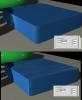
Trying to make scratches on each side of this shape that are "aligned" with the sides. One side always has the scratches at a slight angle. :mellow: I went into the overall texture map controls and gave the x a slight angle which did not work as the top scratches increased in size by 10.
-
I have seen mall store fronts done in 2d very well, as long as they are far enough away from the camera and there isn't too much camera spin. If you search around another user Vic3d has done some recently.
-
Silly Question Regarding MForge
S. Houtzager replied to kbartlez's topic in EIAS Plug-ins and Shaders
Just put them into a folder into your Materials folder. Then you can access them in your materials palette and drag and drop them onto your object's materials sphere. Some several maps involved with them. The most "complex" shader ever made. -
Because my stomach is growling!
-
Hey Tomas, Throw a Dog a scrap and post a rendering done in V9!! One with some GI and sunlight would be great. :cool:
-
Apu, you could model up a single sided piece of geometry that matches up where the logo goes. Then put the logo on the single sided piece the same way you did to the copy of the coke bottle. I used that method to do the syringe markings on the syringe renderings I posted a month ago.
-
Some people are using the free Blender to do fluid animations and then importing that into EI. There is a video in the tutorials section of someone using an older blender fluid animation and importing into EI. http://www.eias3d.com/category/video-tutorials/eias-workflow/
-
Very nice. Like the way the diamond tumbles on each facet. Caustics would be interesting.
-
That image pops! Love the wake behind the ship and different shades in the water.
-
I just textured map a cube's front and back with 2 different maps and it worked when I clicked off the negative Z button. I had to reduce the map slightly so it did not bleed. There is a tutorial on it on VTC.com called texturing by hand. Steve
-
I just textured map a cube's front and back with 2 different maps and it worked when I clicked off the negative Z button. I had to reduce the map slightly so it did not bleed. There is a tutorial on it on VTC.com called texturing by hand. Steve
