Tomas Egger
-
Posts
3514 -
Joined
-
Last visited
-
Days Won
20
Content Type
Profiles
Forums
Events
Everything posted by Tomas Egger
-
Ola Dan, Please, Do a really simple scene, only a empty Room with a Window or a Door, we can try here do a Step by Step to help you understand Photons and GI :) Thanks Tom
-
 Ola Steve, Rodeo dont have this option, All objects needed to be constrained spinning wildly and then in a exact moment fly around with a gravity force in the center of these groups, correct? Thanks Tom
 -
Ola Steve, You miss controllable “Forcesâ€. Thanks Tom
-
Ola, Ian did some nice videos explaining How to use Photons + GI.. http://www.eias3d.com/category/video-tutorials/render/ but, we are taking care of EIAS 9 Photons. Lets see what will happen :) Thanks Tom
-
Hey Ito, These “errors†make the best discovers since the pre-historical humans :) Thanks Tom
-
Ola Al, Great TIPS!!! Thanks Tom
-
Ola Apu, Yes, Since I didnt know what you would like to have in the final Animation, was my first thought. :) Enjoy it Tom
-
Ola Ito, Totally modern and nice concept!!! Thanks a lot for sharing it Tom
-
Ola JK, “Hi. I was an EIAS user from some years back. Been using Modo and Maya for a while and am now learning Houdini. However, EI was always my favorite. Camera was always, to me, a very "pretty" renderer with a nice, filmic-like quality to it. It was not difficult to get good looking renders out of it like it can be with Mental Ray for example.†- Im glad you like EIAS like us. “I would love to be able to come back to it but, right now I cannot due to two particular issues - 1) no multi-threading in Camera (though I understand this is being addressed (at last!). and 2) no 16 bit or 32 bit linear gamma workflow and floating point image output. 32 bit OpenEXR files containing linear HDR image data are pretty much the standard now in compositing pipelines and that is what I need to output. What's the word on the possibility of getting this in Camera? (I would love to see you guys dump the Image file format altogether and output standard formats such as OpenEXR and PNG files instead.)†- Camera 9 is totally MP and 64 bits now, “The beast†:) - 16/32 bits output are planned, but only after EIAS 9 release. - EIAS 9 reads OpenEXR (ILM), We will made OpenEXR output available together with 16/32 bit output, make more sense. - EIAS 8 render PNG frames and we did some extra additions to this theme, but we will provide the info in the EIAS 9 release. JK, We are really in focus to make EIAS more and more powerful, fast and robust as soon as possible. “I would also love to see you support Collada and Alembic file types for getting 3D data in and out of Animator. It would be especially useful to me to be able to go from Modo to Animator or Modo ->Houdini ->Animator.†- Btw: Our new import system made us really happy. - We have some extra info about this theme, but I cant comment right now. - I read about Alembic from ILM, we didnt have time to look futher on it, we are running like nuts here. :) “In short, you guys need to convince me why it would benefit me to re-invest in EIAS again vs. staying with a Modo/Maya/Houdini workflow.†We are working really hard with lot of care because we always loved EIAS, I hope you enjoy it. Thanks a lot Tom
-
Ola Apu, 1) Go to your rest position of your animation 2) Zero out all deformation values 3) Parent the Clow Head in the coil "mola", move the Clow Head (children) to be in the top of the Coil. 4) Go to your Link window and make the Clow Head "inherit" Deformation like the Coil. 5) Go to your "Coil" Deformation window and re-size the influences deformation areas of the Coil to include the Clow head 6) Scrub in your Animation, the head will follow the Coil Thanks Tom
-
Ola AVT, Your tests are working really great.. Are you exporting from Maya using Point Oven? Thanks Tom
-
Ola AVT, Sure you can, you will need to use only one MDD plug-in with all groups as children, then place all MDD files in a unique folder inside EI Folder, like "FBX" for example. Then you will set the Folder "FBX" and set MDD plug-in to read all MDD files at once, you will write something like "BBallPlayerFBXASC03228_*.mdd", "*" means the part of the MDD files which change the name to represent the exact group. With this feature, you can easily read scenes with hundred of groups ;) Hope that helps Thanks Tom
-
Ola, So, we are two, because I love photons too ;) EIAS 9 will bring even more!! Btw: wonderful render.. ;) Thanks Tom
-
Haha.. Viva Chile!!!! Thanks Tom
-
Ola Michael!!! Wonderful renders!!! About EI / Archicad, please, post your request here :) : http://www.eias3d.com/forums/forumdisplay.php?fid=10 About, the Photons problem, I didnt understand completely, could you explain me step by step the prb? Thanks Tom
-
Ola, Alisdair Jones Demo Reel posted :) http://www.eias3d.com/gallery/ Enjoy it Thanks Tom
-
Hey Rick!!! Wonderful my friend, I was traveling, I lost this thread :) Thanks Tom
-
Ola James, Yes, you will be able to use all RAM in your machine and all processors, larger scenes, really larger render sizes with GI and Photon, so, you will not need to have several Slave folders if you want, only one Camera 9 per machine, Im totally addicted to EIAS 9 :) Thanks Tom
-
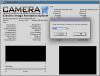
Ola Jeran, Its simple: 1) Close Camera 2) Delete the .ccn file and the render Cache in the EIAS 8 folder 3) then, double click in Camera and go to Camera Menu Bar / File / Settings 4) Change the “Amount memory to be used in render“ from 128 to 2000MB its the maximum amount allowed by EIAS 8. Thanks Tom
-
Anyway to see mousetracker path?
Tomas Egger replied to joseph56's topic in EIAS Plug-ins and Shaders
Ola Joseph, After the steps I wrote, you need to open the Ubershape Channels Arrow / X-Form / and Double click in the Position channel :) Then you can look in the F-Curve window. If you want a curve with less keyframes to edit, instead of small numbers like 0.001 in the Maximum Fit DIstance, you can increase it.. like 0.1 or even 1.0, you need to try and see if you like it. “12) Start Frame 0 and Maximum Fit Distance like 0.001 (small numbers like this force the path be exactly like your Mouse Motion)†Thanks Tom -
Ola, Lets hope all the best to our Japanese friends, from our EIAS3D family. Thanks EIAS3D team
-
Ola Felix, Enjoy it.. Thanks Tom
-
Ola Felix, Only “unskin†the eyes and group them in the Head Bone :) Thanks Tom
-
Ola, Did you find a Freelancer? Thanks Tom
-
Ola James, Thanks for your tip :) Tom