Tomas Egger
-
Posts
3514 -
Joined
-
Last visited
-
Days Won
20
Content Type
Profiles
Forums
Events
Everything posted by Tomas Egger
-
Ola Mark! Great! play a lot with it :) Thanks Tom
-
Ola, This was one of our latest complex changes on GI, related with Speculars / Reflections. Could you simplify the project and send to me? tom@eias3d.com Thanks Tom
-
Ola David! Your test was done in your local Camera with 16 threads in 17 minutes ok? If you setup to render directly in Local Camera without Rama, How many time per frame? In the local Camera, Are you using 32 or 64 bits? Now, the second machine, the slave, How many cores? 32 bits or 64 bits? Thanks Tom
-

Which plugins have been updated to 64bit to date?
Tomas Egger replied to bbuxton's topic in EIAS Plug-ins and Shaders
Ola Derryl, “Many older projects won't open in 9 without crashing.†How old? is it previous than 6.6 Mac intel version? if yes, they have a chance to crash, since, they need a manual conversion. If its a EIAS 8 project, please, only collect the project and send us. About Shaders / Plug-ins: - Most of Shaders from Triple D Tools were done by Chris Bernardi (Pixar), he is interested in update, but he is in a deadline right now. - We are updating our Konk tools. - We plan to update Para tools to 64 bits also. - Triade Shaders will be updated. - Northernlights 3D are Blair’s tools, only him can answer that. Thanks Tom -
Ola Maher, Yes, we did Huge change, now, we have two new kind of caches combined (Irradiance + Screen caches). The combos now are: If you want fast Photon maps with reflections + refractions use All photons lights in GI & Secondary + GI window with Secondary “none†If you want fast Photon maps with more realistic reflections + refractions use All photons lights in GI only + GI window with Secondary “draftâ€, Lights need to be in Draft mode too. Draft = 50% of secondary rays Medium = 75% of secondary rays Full = 100% of secondary rays NOTE: If you want to use â€Full†secondary in the GI window to have the best reflection (only if its necessary), remember, all the lights need to be in “Full†too, but if all lights are in Full mode and the secondary GI window is in “Draftâ€, GI engine will use only 50%. Our Secondary rays are tons of times faster than EIAS 8 now. Thanks Tom
-
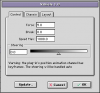
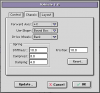
Ola Mark!! Bullet_AutoSteering Bullet have auto Steering, means, after you rig your car with Vehicle plug-in, you can turn the animation “on†of the plug-in and draw a path with it, when you open the Bullet simulation window and simulate, Vehicle plug-in will try to follow the path you draw to move your car, pretty simple :) Here, the Axis direction of your car in rest position: And the full speed you want your car need to reach, don't forget, you can animate these parameters to accelerate or break: The reflex planes were only a simple touch to make the look of the cars nicer, The planes were parented after the simulation :) Take a look in the manual too... Hope that helps! Thanks Tom
-
Ola Maher! Awesome!! Im waiting to see it fly! Thanks Tom
-
EIAS 9 and Video Card preferences?
Tomas Egger replied to supernovavfx's topic in EIAS General Forum
Ola Scott, Im using the same Nvidia 8800GB :) I never tested in GTX 570, probably its a amazing card which will accelerate the redraw performance and can allocate more data in the memory. Thanks Tom -
Ola Steven!! Really well done! Thanks Tom
-
Ola Dan! Im tweaked my scenes with Photons, simply because they become a lot better and faster than EIAS 8. Thanks Tom
-
Which plugins have been updated to 64bit to date?
Tomas Egger replied to bbuxton's topic in EIAS Plug-ins and Shaders
Ola BB, So, right now, the PSD render in layers with background is the best way, we will analyze the shadow catcher shader feature, but It will take time :) Thanks Tom -
Ola BB, Sometimes we talk, he had some personal problems, its why he dont want to move with his tools. Thanks Tom
-
Which plugins have been updated to 64bit to date?
Tomas Egger replied to bbuxton's topic in EIAS Plug-ins and Shaders
Ola Brian, Smart IBL is really cooool :) Look the Feature 4.8 - its exactly for this. http://www.eias3d.co...a-feature-list/ Sample Project: Download Btw: This is my personal trick to have shadows over SmartIBL without compositing Shadow_Mask.zip 1) After you choose the Background position with Smart IBL 2) Render only the background.img 3) Use it in Rotoscope tab 4) Copy it and paste in the Camera Map tab to project in the floor as Diffuse only (using a selection set) 5) Floor need to receive Shadow only and have the color of the shadow you want. Done :) Thanks Tom -
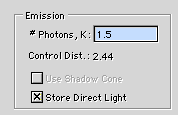
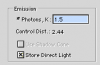
Ola Dan! To have the light intensity like EIAS 8, you need only change the Emission #Photons, K value to something like 1.5. Reflections will not be the same, since now, we use more modern algorithms, like Irradiance and Screen caches. Note: to faster renders and correct Photons values now in EIAS 9, I will need to explain you How, but it will change a bit the final render, when you want, I can teach you, its simple. Hope that helps Thanks Tom
-
Ola BW, Please, check. Thanks Tom
-
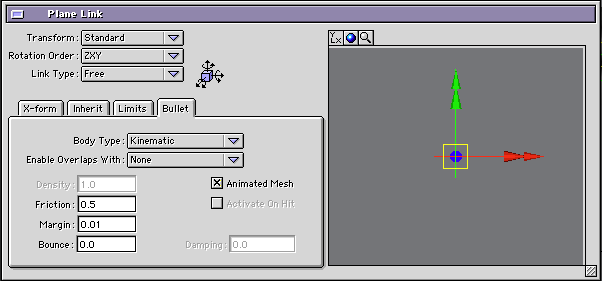
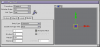
Ola BW, Take a look in the attached project: Bullet4_AnimatedMesh.zip I didnt test with Morphing Targets, you need to enable the “Animated Mesh†check box. Thanks Tom
-
Ola BW, My guess, Dante cant display in EIAS 9 preview using some specific options, lets see what will happen, we are thinking about it. Thanks Tom
-
Available Konkeptoine updates for EIAS v9 - Encage 32/64 bits - Download - MForge 32/64 bits - Mail us More updates coming soon Note: for model plug-ins just download new .plm file(s) and use them with your .rsc. For shaders please mail us your name and dongle, we will send you new authorized files Thanks EIAS3D team
-
Ola Scott, About Displacement on Objs, please, Download these two new samples and render. Displacement EXR2mesh Thanks Tom
-
Ola Mark!! Demo cant save, cant render Animations, cant use Rama and cant use 3rd party plugins / Shaders. Hope you like it :) Thanks Tom
-
Ola BW! We are working on our supported Konk tools right now! Thanks Tom
-
Ola Scott, Camera v9 using one core is faster than Camera v8. Thanks Tom
-
Which plugins have been updated to 64bit to date?
Tomas Egger replied to bbuxton's topic in EIAS Plug-ins and Shaders
Ola Bbuxton! We are working right now on our supported Konk 64 bits tools. The tools included in EIAS 9 release are totally 64. Thanks Tom -
Ola James! Awesome render times!! I need to post mine too :) Thanks Tom
-
Ola Frankg, Ahh, its interesting, its crashing for me, but I have both. Thanks Tom