Tomas Egger
-
Posts
3514 -
Joined
-
Last visited
-
Days Won
20
Content Type
Profiles
Forums
Events
Everything posted by Tomas Egger
-
Ola Alex, Really great my friend!!!.. Thanksss Tom
-

Team up with Newercenter Silo modeler again?
Tomas Egger replied to joseph56's topic in Features propositions / Ideas
Ola Joseph, The Pro side = Its a interesting idea The Cons side = look their forum, a lot of silence, dont know whats happening there, if appear more info from them, I will contact. Thanks Tom -
Ola, Hehe, have fun with your creativity now.. time for more videos. Thanks Tom
-
Ola my friend, We can ask Chip Pedersen help too, he is doing great simulations with SimCloth. If I have time, I will help for sure.. :) Thanks Tom
-
Ola my friends, Mark’s Video Tutorials are posted in our web site and Vimeo Tutorial group.. :) Thanks Tom
-
Ball Bounce and pinned cube videos from the EIAS gallery
Tomas Egger replied to apu's topic in EIAS General Forum
Ola Chip, Thanks for your answer.. Tom -
Ola Vgd, I forgot.. Amazing renderings and animations.. :) Thanksss Tom
-
Ola Vgd, First of all, if you already created some intances, open Instancer channels, you will see all there separeted, they can be controlled by XP too. About Simcloth + Rodeo, Did you see our Simcloth 1.1 video tutorials? Thanks Tom
-
Ola Mark, Dont forget you can apply shaders using the Shader Palette window.. :) Thanksss Tom
-
Ola Joseph, EIM is EITG property, a long time we dont have info.. Thanks Tom
-
Ola my friends, I totally agree with Michael, I learned EIAS from Zax videos, amazing tutorials from Ian Waters and new pieces like Mark is doing help a lot all users. I will love to see your tutorials too Michael. I want to produce mine too.. ;) Thanks a lot Tom
-
When Rendering asking for QT format
Tomas Egger replied to S. Houtzager's topic in EIAS General Forum
Ola my friend, You were faster than me, I tried to render directly from Local Camera, worked fine when choosing the quicktime format. Now, I understood your problem, you were searching the Quicktime VR pop-up, so, the “none†option was the one which you were looking for. Any prb, message me Thanks Tom -
Ola my friends, Better I/O is important for sure. Thanks Tom
-
Could not open a file on the Tutorial Page
Tomas Egger replied to S. Houtzager's topic in EIAS General Forum
Ola my friends, we are looking at this.. thanks for your attention Tom -
Ola my friends, CJ Berg have a Instanter plug-in, I will send a message to him.. Thanks Tom
-
Ola Alex, Thanks for your answer.. :) Tom
-
Ola Richard, Like After Effects.. :) Please, post this a User Pack Request. :) Thanks Tom
-
Ola redcode, EIAS dont have a UV automatic unwrap system, until now, doesn't exist a magical UV unwrap system in the 3d market (the closest one to magical is UV Master from Zbrush). If you have a model with UV data, become easier, so, you need to bring it inside EIAS and add the texture, since its a UV coordinate, the texture fit automatically. Sure, one of our goals is make 3d cross data easier to our user base, we are always researching. Thanks Tom
-
Ola Juanxer, It's more like MDD. Thanks Tom
-
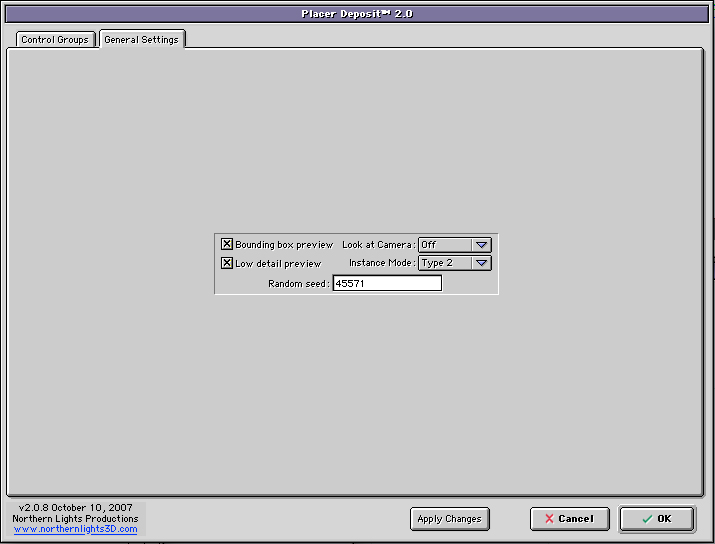
Ola Rob, Dont forget you can use the General Settings Tab inside Placer which allow you to have more instances in your “rat†without give you RAM problems. - Instance Mode Type 1 and Type 2 allow you to have more instances in the surface. - Bonding Box preview - OpenGl redraw less polygons. A long time ago, I did a mouse with Placer :) Hope this help Thanks Tom

-
Hey Mark, This is great!!! Why you dont add your tutorial in our Vimeo Tutorials group? Really wonderful to see you producing video tutorials... its a great way to learn too!!! http://www.eias3d.com/forums/showthread.php?tid=308 Thanksss Tom
-
Ola Mark, Lets them work more in this project, then we can have a closer look. Thanks Tom
-
Can you add 3d world review to website?
Tomas Egger replied to joseph56's topic in EIAS General Forum
Ola Joseph, Good idea... Thanksss Tom -
Can you add 3d world review to website?
Tomas Egger replied to joseph56's topic in EIAS General Forum
Ola Joseph, It's a good review, I have it scanned, I will try to reach 3D world mag and see if they allow me to show it. I was copyright afraid. Thanks Tom -
Ola Dieguito, This is Marvelous!!!! Awesome!!!! Thanks Tom