


Tomas Egger
-
Posts
3514 -
Joined
-
Last visited
-
Days Won
20
Content Type
Profiles
Forums
Events
Everything posted by Tomas Egger
-
Ola Alex! I never saw this one!!! Who developed? Show the plugin UI! Thanks Tom
-
Ola Alex! Which Gear plug-in? Thanks Tom
-
Ola Maher! Just tested! They fixed :) Please, any problem, send to me.. Awesome!!! Tom
-
Ola Paul, Last month I sent to Silo developers an email showing the problem again, I need to check if they fixed, it was not working in Mac Intel machines. Thanks! Tom
-
Ola Nori! We have plans to improve the Panoramic output. Thanks Tom
-

development news or updates?
Tomas Egger replied to supernovavfx's topic in General Development and Updates
Ola Paul! Those renders are only a simple example :) Our next EIAS upgrade have more focus on Animator :) Thanks Tom -
Ola Alex! Good steps :) Thanks Tom
-
Ola Nori! Nice :) Thanks Tom
-
Ola Nori! I am glad you understood and its working.. show us later your tests.. Thanks a lot Tom
-
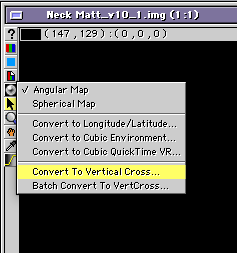
Ola Nori! Sorry the delay to answer, as soon you render a snapshot or render a Environment sequence in Camera, in the Image viewer window you have these options: 1) Convert to Vertical Cross (if its only one image rendered) 2) Batch Convert to VertCross (if you rendered an animation image sequence) After the conversion, you need to find in the internet a software to covert from Vert Cross to Equirectangular style, or any other format, a few examples here.. https://www.outerspace-software.com/bixorama http://paulbourke.net/miscellaneous/sphericalpano/ http://ggnome.com/pano2vr https://www.ptgui.com
-
AVTPro's ReadyRigs "FACIAL Animation" DVD
Tomas Egger replied to AVTPro's topic in EIAS General Forum
Cool Alonzo! The next upgrade will use a lot of these tutorials :) Thanks Tom -
Ola Nori! Kim, one of our users which is working with VR will soon answer you :) Thanks Tom
-
Dynamic Character Animation and Simulations
Tomas Egger replied to AVTPro's topic in EIAS General Forum
Really cool AVT!! Thanks Tom -
Ola Rod, - Right now on EIAS 9.1, only Placer Deposit from Northernlights3D can do this.. but its in our plans :) - If you use Master Materials.. even if you duplicate several times the same model and all will be using only one Master Material, every time you change the material, everything will be updated. Thanks Tom
-
Ola Joe! Really Nice render.. Camera crashes with huge density Ubershape I guess, try this, make Ubershape more dense to try it, but export as a fact and re-import and try to render it. Thanks Tom
-
development news or updates?
Tomas Egger replied to supernovavfx's topic in General Development and Updates
Ola Joe! Whats happening, we are revising each area of Animator before the release, code refactoring for example, new features, right now, we are in the morphing window ;) Thanks tom -
Ola Steven! Add que EI quicktime component in the OSX library :) http://telegraphics.com.au/sw/product/eicomponent Thanks Tom
-
Ola Gabe! The fast method is make your model less dense and replace in the project.. it will be faster to render :) Thanks Tom
-
Ola Gabe!Yes, I have 32GB of ram for Camera :) Are you not using really heavy geometry for your renderings? geometry dense polygons?ThanksTom
-
Ola Giga! Yes, we will updated Gelmato info, we are talking with them since the acquisition and in the installers we will have everything updated including the Sierra and Win 10 new security system requirements :) Thanks Tom
-
development news or updates?
Tomas Egger replied to supernovavfx's topic in General Development and Updates
Ola Paul & Felix! As soon, we became closer to release, I will try to post something interesting :) Thanks Tom -
development news or updates?
Tomas Egger replied to supernovavfx's topic in General Development and Updates
Ola Felix! Our "Animator" was missing a lot of new care ;) thanks tom -
development news or updates?
Tomas Egger replied to supernovavfx's topic in General Development and Updates
Ola Felix.. New options are appearing more and more :) Thanks Tom -
Hi Nori-I saw your post on the EI website and downloaded your file. (I assume you received my direct Email with the samples I sent you?) Your models are fine now, but some of your Bullet settings needed to be changed.Your “Decomposer” in the Link Window was set to “Default”. This option only works for very simple simulations, and I suggest using “VHACD” for all of your simulations. It has to be set for all the links.Then I experimented with the “Force Scale” (a global multiplier applied to all elements in your simulation). The links were coming apart and I reduced the force scale incrementally to 0.05 so that the links would remain together. (Try increasing the force scale yourself to see the results.) The Preview.mov file shows all the frames in the animation, and the final movie was rendered every 6th frame to get a more realistic speed. You were very close to a solution - it just takes some experimentation to interpret why the links were coming apart.All you have to do now is attach your high-res links, turn off the low-re links, and do a final render every 6th frame (or whatever speed you like).Tomas: This thread has gotten a few hundred reads on the EI website. Maybe you might want to post these files as the final conclusion so everyone can see how to solve the problem?Good luck with your project Nori! I’m glad to see you were very near to the correct solution :-)Chip SOLUTION FOR NORI.zip
-
development news or updates?
Tomas Egger replied to supernovavfx's topic in General Development and Updates
Ola Felix! We are solving some complex problems right now.. no ETA yet :( Thanks Tom
