bwcc
-
Posts
192 -
Joined
-
Last visited
Content Type
Profiles
Forums
Events
Everything posted by bwcc
-
freakin' awesome!!!, so far so good. I linked it to a source model with 103,000 polygons. Not only does it work, but it much faster. Now, can we fix Dante?? I'll test it. thanks! brian
-
I have noticed a potential bug/problem in using Mrs Bebel. I have a model exported from Modo and used it as a source for a Mrs Bebel object. If the polygon count on the source gets to high it will return with a memory error. As I investigated further, using a UberShape as the source. Mrs Bebel will work on a model with 74209 polygons, but not with 74210 polygons. it doesn't matter what the profile is either. A surface with 74209 polys will work with a very complex profile curve, but 74210 will not work with a 2 point straight extrude. I don't think I have ever completely understood how memory is shared between EIAS and Plug-ins, but I have plenty of memory (18GB). Is this something that can be fixed? Is there anyway around this limitation? thanks, brian Mrs Bebel bug.prj.zip
-
An audio alert would be great, I used to have a utility that did this. It would play a sound whenever a specified app (Camera) quit. I can't remember the name of it now, it was back in the PPC days. I've seen it in other apps, but I would also like to able to have Renderama send an email when it finishes a job. bw
-
EIAS, being what it is, would really benefit from adding FACT export to as many apps as possible. I know with every modeler I have, I look to see what formats I can export. If there is one I have never heard of, I research it to see if it something I can use. I addition to Modo, I would love to see a FACT export from Rhino3D. It's really a marketing strategy. To get users of other apps to look up EIAS and see what it is. brian
-
Would it be possible to develop a FACT export from Luxology Modo? Is this something anyone could do, or does it have to be developed from within Luxology? thanks, brian
-
http://www.eias3d.com
-
I do a lot of scientific and medical device animation. I usually use Dante to animate instances of a specific model and the perspective and camera position can change over time. Usually the object particles need to interact intimately with other objects in the scene. I have Particular and I use it when I can for more organic particle effects, it's great for motion graphics fluffy stuff. But, I have many projects where the 2d particles just look too flat.
-
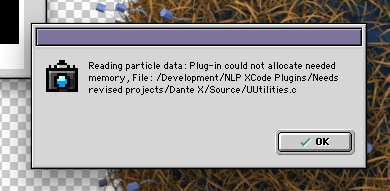
I've tried it all. The problem is with Renderama. Dante works fine from within EIAS, it's when you try to render with Renderama it will get an error with each Camera. I have a scene with nothing but a default Dante object. No imported models or UberShapes or anything else, and I still get the error. Apparently the problem came from the UB port of Dante and it hasn't worked since. brian
-
I can't use the shader NoiseSpline, I get an error message: "The selected file cannot be used as a texture or shader (missing image data or shading code.)" thanks brian
-
Well, it's been few months. Any word on Dante being fixed? I think I must the only person using it... brian
-
Actually 5.5.3 came with (I think) EIAS 6.5, Transporter 5.5.4 came with 7 & 8. I don't use 554 because it is too slow with big models. It wants to recalculate normals whether you tell it to or not. It can take hours to convert very big models as compared to seconds with 5.5.3 bw
-
When I use Transporter I will often write over an existing previous version of a file so it will link correctly when the EIAS project is reopened. When I save the file from Transporter it will ask if I want to replace the existing file. But the the file doesn't get replaced and instead Transporter creates a new file with a seemingly random 8 digit number and no extension. I can rename the new file and it all works correctly. It's a minor inconvenience, but it's putting a snag in my workflow. I am using Transporter 5.5.3 OS X 10.6.3 and a 8 core MacPro Is anyone else getting this? thanks, brian
-
Hi Fantomaz - Do you use Parallels, VMWare Fusion, or something else? Which version of Windows are you using? thanks! brian
-
Does anyone have experience using Okino PolyTrans to covert Models for EIAS? I'm looking for a good solution to export from Modo and convert to FACT. It can import an obj or lwo and export to FACT. It will also import SolidWorks and export to FACT for EIAS or IGES & SAT for EIM. any other ideas would be welcome. thanks, brian
-
In your network settings, for Configure IPv4 select "DHCP with manual address" you can then enter an IP address. Use this IP to set up all your Renderama slaves. Using DHCP can change the IP address each time you restart. Using the "manual address" will keep it the same. If your Slaves are already set up, you can enter that IP address into the network settings and it will all connect. brian
-
Placer Deposit works great for this. I also have used Image2Mesh to generate the Stamp Surface, this way you can create a terrain to cover with the rocks. I haven't tried EXR2Mesh in this way but I imagine it would work as well. The weight maps will work to determine where the rocks are placed on the surface. But, the Placement Filter Map (weight map) has an "on / off" effect. It doesn't decrease or increase the number of stamps based on the gray scale image. It's either black or white regardless of how smooth the map is. The scale works though. Also not sure if it matters for this, but weight maps cannot be animated. So if the placement of the objects needs to change over time the weight maps won't work. good luck, brian
-
EIAS really needs a good particle system. Starting from the included plug-in "Particle" some basic improvements / additions would be very helpful. 1. Emit particles from a surface (normals or defined direction) 2. Attach objects (preferably multiple objects) to particles (instances) 3. Random, scale, orientation, rotation of attached objects. 4. Scale, Color, Transparency over time. 5. Editable random seed I'm sure there are many more features to suggest but this would a great first step. thanks, brian
-
I have tried this many, many times without success. I really don't know, but I think what happens is renderama might render the particles correctly without Renderama Mode, only if it just happens to begin and end each frame in order. Like if you render in rama with only one Camera, it finishes a frame then begins the next. You can use more Cameras if each frame takes the same amount of time to render. But, like in most real jobs, one frame may take much longer to render than others. So a Camera can render one frame while the other Camera could render 2 or 3 in the same time, this gets the generated particles out of order. The more Cameras you add, the more likely it is to get out of order. This is what "Renderama Mode" was designed to fix and it did. Then EIAS updated to UB and broke it. brian
-
Hi Again - this is true, I think it has always worked well without renderama. But, that's a little like saying I have a fully functional car that only uses first gear. Sure, it works and runs but it's effectively unusable. I have 12 cores for rendering, a fairly basic 10 second animation at 30 minutes/frame would render in about 10 hours. Without renderama it's 5 days. Clients just won't wait that long. I have been using Power Particles Pro and it works in Renderama by writing out a separate file for each frame. It's just such a shame that Dante, which adds so much to EAIS, is basically useless by what seems to be a very fixable problem. Even if NL doesn't have the need or desire to fix it, is there anything that could be done in EI? If I can display each frame correctly in EI, could that information be saved in the individual frame control files for the animation? Or something like the way PPP does it? I know I'm grasping, but I am desperate. brian
-
Hi Michael - thanks for the info, but according to NL you have to use "Renderama Mode" or else you get animations like like the one attached. http://files.me.com/brianwhite3/l7gp7a.mov Apparently "Renderama Mode" writes the particle data for each frame so then then each Camera can recall the position of particle based on the frame number. I rendered this animation with Renderama Mode turned off. And the particles are generated out of order. I also got the error as the frames were rendering but as long you keep clicking ok it will render. I have heard that if you reduce the memory for Camera, the error will go away but that's not a solution. I have projects where 2GB isn't enough. thanks, brian
-
Hi Igors, what's is this? I have tried it in Version 7 on a G5 (PPC) and I get the same error. Not sure what the "CFM" is. thanks, brian
-
Hi Tom, the error occurs because Dante in the project has the "Renderama Mode" checked on. If you turn it off it should advance and render correctly. The project will render perfectly without using the "Renderama Mode" but that's really problem. Any Dante project will render without Renderama, I think it will even work in Renderama if you don't use "Renderama Mode" but then the particles get generated out of order. To get the particles to generate correctly in Renderama you have to use "Renderama Mode" but then it won't render. As far as I can see, the problem is "Renderama Mode" and apparently what it does hasn't changed since its inception. But, whatever it does worked just fine in EIAS 6.5 but not in 7 or 8. brian
-
Any word on this yet? Is there any chance it could ever be fixed? brian
-
Some feature I would like to see in EIAS9...
bwcc replied to Hiddenman's topic in Features propositions / Ideas
I would be in favor of a way that could be animated. I could be wrong, but I don't think strength maps can be animated. Or, we could add "animated strength maps" to the request. bw -
Some feature I would like to see in EIAS9...
bwcc replied to Hiddenman's topic in Features propositions / Ideas
This would be great, especially for twist, linear wave, and runwave. At least some way to define an area where the amount of deformation could transition to zero. Maybe a region stacked on top that could apply a factor to the amplitude or angle of the region underneath. or it could be set from within the existing region as a percentage of the region dimension to fade the amplitude to zero. bw