Tomas Egger
-
Posts
3517 -
Joined
-
Last visited
-
Days Won
20
Content Type
Profiles
Forums
Events
Everything posted by Tomas Egger
-
Ola Frank, Thanks a lot for your tests! Tom
-
Ola Frank, Let me test :) Thanks Tom
-
Hehe, Sorry.. I mean, is it the same with Snow Leopard? Thanks Tom
-
Ola, I will take a look :) is it the same in EIAS 8? Thanks Tom
-
Hey Joe, These tricks always help us :) Thanks Tom
-
Hey Joe, Its nice and subtle :) Its more a artistic option, if you want more aggressive or not. You can try a After Effects trick too, easier to edit :) http://www.videocopilot.net/tutorials/camera_shake_with_wiggler/ Thanks Tom
-
Ola Frank!! I will take a look later :) Whats slower? Thanks Tom
-
Hey Mat, Please, send me your dongle in my email. tom@eias3d.com We are discussing how to bring the unlock code page back. Hope that helps Thanks Tom
-
Ola, OSX Lion will "break" Frogblast and all other native OSX Hotline clients which all rely on Rosetta to run. There is a Java based client which is available here: http://eias3d.com/WebDownloads/Pharerouge.zip Please install and set up with your Hotline settings. Thanks Tom
-
Hey Aziz, Thanks a lot Tom
-
Ola, Since we are testing EIAS 9 and Lion, we are in contact with Safenet, the Dongle supplier which gave us the new installers for OSX Lion, please, install all and notify us, we have some testers which are already using Lion, EIAS 8 and 9 with these installers. http://www.safenet-inc.com/uploadedImages/SSD752(1).zip http://www.safenet-i...ac%20OS%20X.zip http://www.safenet-i...ges/SKPI131.zip http://www2.safenet-...es/Eve32403.zip Thanks a lot Tom
-

Blurring global relections.
Tomas Egger replied to BJMonkey's topic in Features propositions / Ideas
Ola BJ, Right now, I can't promisse anything. :( Let's see.. Thanks Tom -
Blurring global relections.
Tomas Egger replied to BJMonkey's topic in Features propositions / Ideas
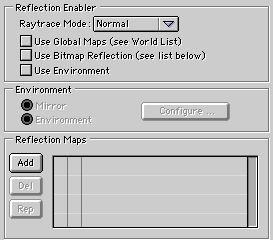
Ola BJ, Hmmm let's think togheter.. The only way now to have the same map but with a different blur is copy the map or hdri in the reflection tab, then select all groups in the project window and paste. Other way would be use master materials selection sets.. Hmm.. Interesting Thanks Tom -
Ola Tango. EIAS 9 have a solution for this :) Thanks Tom
-
Ola Tango, Microscope is our support, if you have issues, do a simple project and message us :) http://www.eias3d.com/products/konkeptoine-plugins/reunion/ I personally used, AG_Glow to do the trick :) http://www.northernlights3d.com/AG_Shaders/agproducts.html Here a sample: Thanks Tom

-
Blurring global relections.
Tomas Egger replied to BJMonkey's topic in Features propositions / Ideas
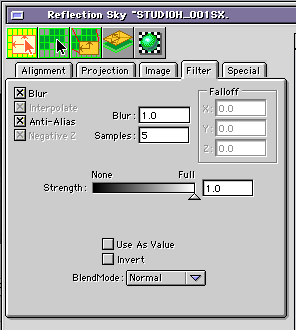
Ola BJ, If you blur the world reflection, it will blur equally every group in the scene. But you can use a reflection per group too, in the Material group info window: You enable use bit map reflection (see list bellow), then double click in the texture, which can be a .hdr too and there you will have the Blur box too. Please, test it. Thanks Tom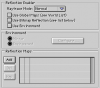
-
Blurring global relections.
Tomas Egger replied to BJMonkey's topic in Features propositions / Ideas
Ola BJ, Yes, I understand, but what happens if you change the Blur setting in the texture window? Thanks Tom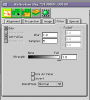
-
Ola Tango! Lets GO!!!! Thanks Tom
-
Hey BJ, Yes, we did lots of changes ;) Thanks Tom
-
Ola BJ, Block distance tells Camera to use the Rays only in the windows holes, if you not use it, a portion of the rays will be lost in the windows walls, it's a really good feature to optimize the smooth renders with render speed. Thanks Tom
-
Blurring global relections.
Tomas Egger replied to BJMonkey's topic in Features propositions / Ideas
Ola BJ, Do you mean, without blur in Photoshop manually? Thanks Tom -
Ola BJ, In some cases yes, having 2 lights helps to control more “artistically†How the illumination works and How it bounce in the room. Hope that helps Thanks Tom
-
Ola Alberto, Please :) Thanks Tom
-
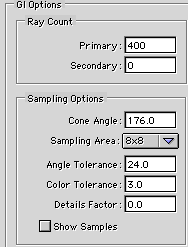
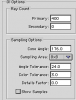
Ola Vic, The same trick used to plates will work here, increase the Color Tolerance value to 3.0 or more. Thanks Tom
-
Ola, Sorry, this one: http://www.eias3d.com/forums/topic/529-loving-these-photons/ Thanks Tom