


ShaddamIV
-
Posts
42 -
Joined
-
Last visited
-
Days Won
2
Content Type
Profiles
Forums
Events
Everything posted by ShaddamIV
-
Can you imagine that for 5 years EIAS probably did not receive any money and they have to pay for the programmers? I would rather pay less more frequently and see EIAS grow than to think : I made a good deal. I agree there need to be an option to buy the full software.
-
But at the same time, it would allowed to improve the software at a much faster rate. All non-subscription 3D software are dead now or have not evolved. Also the starting price is too much for 80% of the people.
-
I just uploaded a video that I made 15 years ago. Because CG is always perfect and clean, I went to a plant, just before it closed for good to take hundreds of pictures for reference. I took picture of everything that is messy, rusty and dirty. This is what real life is : chaos. If anyone is interested, I still have the original high-rez pictures. I still look at them before modeling and texturing just for inspiration. 3DCG is too artificial and it is not just the model and material, the placement of stuff also. There is tons of out of place objects scattered around. If it is too boring to watch, increase the speed of the playback in youtube. https://youtu.be/KshgvU591Z0
-
- 1
-

-
Last year I started EIAS and it was not starting, i look at the back of my computer and the dongle was not there. I started to panic and looked around and it was simply gone. After a couple of hours of looking for the damn dongle, I looked into the vacuum cleaner. Lucky for me it was there. Not only this thing is expensive, it cost 75$ to ship it to Canada. It also prevent people from ever subscribing to EIAS if they ever implement a subscribe option (with the option to buy a full license also of course)
-
I know the feel, I have been working 3 years on an very ambitious app for iOS. I had to redo many things many times, because Apple is changing the language and sdk constantly. Apple is also changing the rules for the store at random without any infos on how to proceed. I finished the app 3 months ago, but we can't release because some pdf library won't sign on the store. Now I am doing my own gzip library, because it was my 3rd time changing library and they simply stopped compiling or complying with the store. But the thing to remember is to release more often with smaller feature list cause our customers are really tired of waiting for the new app, when the old app is full of bugs and lacking essential features (I was talking about our old app, not EIAS). In my humble opinion proper HIGH DPI support (for monitor and tv above 4k) is the most important feature. This is killing Lightwave, Strata, FormZ, Cinema4d and many others. I mean you can't use them unless you lower your resolution to 1080p and it becomes blurry on a 4k monitor. Lightwave is really useless on a 4k monitor or even 3k 27" Apple monitor. Their users are complaining and they don't care or don't have the resources to resolve it. I know what you have done with version 10 (I have not seen everything yet) and I know all the effort you have put into it. It is worth the wait and I believe that EIAS will take back it's crown as the fastest 3D animation and rendering software on the market soon. Please, also sell/rent/subscription EIAS 10 by small monthly payments to attract new users that don't have the money to buy the full app at once.
-
These videos should be made free by now. Pay Scott Simmons and put those fantastic tutorials on your website where they belong. Tomas, please, never do such a big upgrade at once, do it incrementally next time. Seriously working with EIAS9 on a 55" 4k monitor with windows 10 scaling is torture (because otherwise everything UI is minuscule). You could charge money for smaller upgraded version like the other software do. Waiting this long is "slow water drop torture".
-
https://www.vtc.com/products/Electric-Image-Animation-System-7-Tutorials.htm This is money well spent and even if not fully up to date, it is still 90% relevant of current EIAS. Why is this tutorial series not in the tutorial page on the EIAS3D website? To learn EIAS, there is no better way in my opinion. There is also the old book : Professional 3d with Electric Image Universe by Lance Evans. Honestly EIAS is currently lacking good video tutorials that cover every function in detail in 4k or at least HD video. I will probably make some tutorial along the way when version 10 is released.
-
You did not say : not right now in 9.1 but it will in 10 Will there be another way to do it in version 10? It is not something really important, it's just that it prevent people (younger one) from working a certain way: a more modern way. Like I said, I like working in only one orthographic view that I can rotate around. Working axis aligned is not always possible either.
-
EIAS 9.1 Windows 10 Camera does not start (can't render)
ShaddamIV replied to ShaddamIV's topic in Technical issues
Ok, I did not know that I also had to also install both 32bit libraries on my 64bit os. The two 64 bit one were already installed. So there must be some 32bit code hidden somewhere in EIAS that it link to. Thankyou for the quick response. -
I would like to do like all other 3D software: work with only one orthographic (no perspective) and rotate the view in 3D to fit my needs. A camera view would be fine, if I could disable the perspective. I did not find a way to have more than 1 camera view. I would like to have 1 camera view to see the final result with another single orthographic view to navigate and turn around the scene. Is that possible?
-
When I try to open Camera or render anything in Animator I get : Camera.exe -Application Error The application was unable to start correctly. Click OK to close the application.
-
development news or updates?
ShaddamIV replied to supernovavfx's topic in General Development and Updates
I am not in a hurry, I just want to know if it's gonna be in 2019 or 2020? -
development news or updates?
ShaddamIV replied to supernovavfx's topic in General Development and Updates
Is there an approximate release date for EIAS 10 on PC? I have put my project on hold for 2 years now, waiting for version 10 to start on the right foot. -
I contacted them, but for now there is no way to check it on their website until they create the new one. Maybe I'll code a random scatter replicate plugin with some along surface options and a replace particles with object plugin. I was supposed to do that some 15 years ago and it is still needed today.
-
Does the plugin "Instancing" still exist? That would be nice to be able to automatically copy/place objects over another object.
-
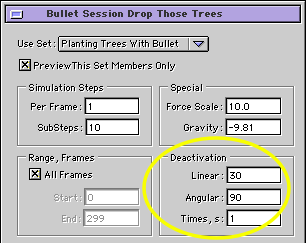
I did it! No need for "Force" or anything. The deactivation conditions must all be met at once, not only one. So the simulation will stop if the object move less than 30 unit and 90 degrees during 1 second. Voila! Of course this must be adjusted to the scene. I learned this technique from a guy working for 3D Studio : he showed me how to place realisticaly books in a book shelves by placing books normally inside, activating the physic simulation then shaking the furniture. He then proceeded to show me how to place rocks on a terrain with the physic. So I guess that this technique combined with "Force" can be a replacement to "Flock" plugin (in some cases).
-
So is this possible? If not I will plant the thousands by hand.
-
Just open the bullet session and press the preview button in the camera 3d view. I did not touch anything this time, so the goal is to lock translation in X and Z and lock all rotations. So as soon as a tree touch the terrain, I would like it to stop moving. Placing stuff with physic is a technique that I have used for a long time. Once the physic simulation is ok, I go to the last frame, create a keyframe for all trees then remove the animation flag (This part is working fine). Then I select all the threes and move them down a little so they dig themselves a little. Planting Trees With Bullet (Lock Translate X Z and all Rotations).zip
-
I have a deformed terrain model. Above it I copy tons of trees, plants and rocks objects. Then I use bullet physic to place those elements (randomly) on the surface of the terrain. It's working, but I would like the falling objects to stop moving on impact and block their rotation (prevent them from rolling). I tried to activate all the limits, all link types and bullet properties without success : everything continue moving and rotating (on the steep hills). In Vue d'Esprit there is a drop function that does exactly that. You place above then hit the drop button. I hope to use this technique eventually with "Force" to place/scatter objects on objects.
-
Thank you so much Tomas I realize that the project management is so much powerful and flexible for GIANT projects. To my knowledge eias is the only software that can hide an object and never see it again in the world view and the project view until you unhide everything.
-
Now I see what the Arrow does, to see it's effect I had to press the triangle beside the channel. But it does not explain everything. If you animate visibility in the Keyframe mode, clicking on the Arrow will invert some values On->Off and vice versa. As for hiding by type, it's not what I need. I want to hide in the 3D World Views not in the project window.
-
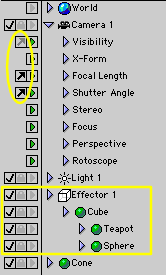
First, what is that arrow flag thing (yellow circle) in the project window? What is it used for? Can you give me an example? Nothing in the manual. Second, I would like to hide (in the world view) the Cube, Teapot and the Sphere in one click without hiding the Cone. In other software I would hide the Effector and all it's children would become invisible. Finally, if the children of a hierarchy are hidden in the project window, can you hide the hierarchy and all it's children in the world view with one click? Found a way, but it is tedious. Let say that the Effector 1 has it's children hidden, but it does not really matter. 1-Select the Effector 1 2-Right click Select/Offspring 3-Hold Shift Key, then reselect Effector 1 4-Hold Command Key the click the Visibility checkbox of the Effector 1
-
Ok found the solution : In the "Alignment" tab of the "Texture window" there is a option for space : (UV, Model, World) This is exactly what I was looking for. So what is the use of having both "use UV Space" in the "info window" and the one in the Texture window?
-
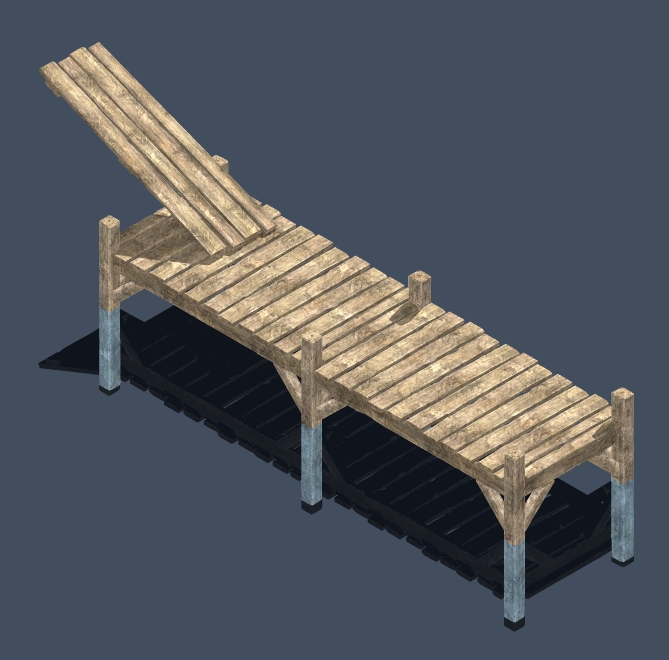
Or does eias support multiple vertices uv per model? If yes, how? I would like to use the model uv space to texture (bitmap) a wood plank. Then I would like to add a dirt bitmap above but this time using the spherical mapping method. I am making a deck made of multiple wood planks inside a single model. Each plank has it's own uv. So the wood bitmap is applied to the object uv. Then I would like to apply a color variation bitmap and dust bitmap to the model by using the cubic mapping or planar instead of the object uv. This is my technique to weather models, so there is a continuity to filth/dirt from one plank to the other. I could use only the EIAS mapping method instead of UV but I have much more complex model to weather later and it won't work. This is the model rendered in Strata that I need to bring into EIAS
-
Dongle Free Animator | Multicaustics
ShaddamIV replied to Frankg's topic in Features propositions / Ideas
The best way to prevent pirating is the Houdini way, they give a fully functional version for free with limited rendering capability (for non commercial use only). For 200$ they give full (for commercial use) version with 1080p rendering limit for company or individual under 70 000$ revenues. Otherwise the software is 8 000$. Houdini is a fantastic program, it's the best 3D software (of the big ones)... If you are a 400+ employees studio. I tried it multiple time and it is fantastic, but it took me 5x more time at each step to do simple things. I had to check in the manual and tutorials at every step, every time. Just to render you have to look for a tutorial and the next day you have to look again because you forgot how to. Big software like Maya, Houdini, 3D Studio, Cinema4D and Blender? are so complex, tedious and boring that each module/step : modelling, uv, rig, animation, lighting, material, simulation, shading, and rendering require a separate department with tons of people. Those software are like the military. EIAS3D is a one man army superhero like Quicksilver. For people like myself doing everything from concept, modelling, uv, rig, animation, lighting, materials, shaders, textures, scripts, simulation, rendering, compositing, sound sampling and video-editing a software like EIAS is perfect fit at a perfect price. And I did not even mention that Camera has the best AA/AAA (Antialiasing) AAver. In my 25+ years of experience with 3D CG, it is best to master a software with less features than to use a software with tons of features that you will never master. And when you watch animations made by amateurs with big software, you can see that the user was "controlled" and oriented by the software and not the other way around. EIAS workflow feel like a toolbox with self contained tools that do not leak across the software. So you never see what you don't need to see until you need it. Many simple, small and efficient tools that rarely if ever require the manual or a tutorial. EIAS is the easiest 3D software and I have tried them all since Real3D/Sculpt3D/TurboSilver. EIAS is the motorcycle of CG : best power to weight ratio. PS : I did not mention LightWave because to me it is a dead software stuck in the past. They should get rid of their modeler like EIAS did and their user interface is unusable with a anything above 1080p and the company does not give a flying f... Did I say I am waiting for my dongle and it is torture? Small price to pay to keep the pirates away.