apu
-
Posts
91 -
Joined
-
Last visited
Content Type
Profiles
Forums
Events
Everything posted by apu
-
Hope they fix it!!!. Thanks Tom, keep us posted with any news you get from them please!!! Thanks!!!
-
After a few betas, Silo 2.2 is available for download. Guess it's not dead after all. Good news, I like this program, though the fact export issue is an issue that I don't know if nevercenter has solved (I hadn't time to test it yet).
-
Tom, when i place two instances of the plug in both of them read the same mesh, even if i have both meshes separated in 2 diferent folders incide ei sockets. I dont know if you can bring different meshes inside eias. Thats why i was considering exporting the mesh as fact and then importing it back into eias. Ill try what you just have told me. Thanks!!!!
-
Hi, the realflow plug in only lets me import one mesh at a time. For this project I need to import two meshes so I can assign different materials to each one of them. I was wondering if I can export the mesh once imported into EIAS, si I can import the other one. If I select export Native FACT object, it only exports one frame of the mesh. IIt's like an static mesh. Is there any way of exporting the mesh with all the frames as a FACT object? Thanks!!!
-
Nice Job Tom!!!. Did you animate each one of the butterflies????
-
Thank you Tom for your answer. I think I'll take a look!!
-
Thanks Tom, but does it work with EIAS 8? Does it work only for fur?. Or it lets you create longer hair?. What kind of control you have over the hair/fur?. And the big question: Is it worth it? Thank you!!!!
-
Hi, I'm considering the option of buying the placer deposit plug in from northern lights to create hair for a character. Does it work with the latest versions of EIAS?. Anyone has any experience with it? Thank you
-
Ball Bounce and pinned cube videos from the EIAS gallery
apu replied to apu's topic in EIAS General Forum
Thank you ver much!!!! I will try these settings tomorrow, -
Ball Bounce and pinned cube videos from the EIAS gallery
apu replied to apu's topic in EIAS General Forum
[Thank you for your answer. I've benn playing with it, but what I don't seem to get right is the settings so the cubes and the balls stay "rigid". They deform as well, and if I increase the stiffness a lot (say 10000), it takes a lot to do the simulation. And most of the times the geometry messes up. What is weird is that with the same settings, if I do the simulation, sometimes it works, and sometimes doesn't. I don't know. This plug in drives me crazy. -
Hi, how were those videos made?. Anybody knows?. I assume it's simcloth for the clothing, but I was wondering how the physics of the ball and the cubes bouncing on the cloth were acomplished. It's great!!!! I love it! http://www.eias3d.com/category/gallery/page/4/
-
Hahahahaha!!!, Thank you!!. I'm tweaking a little bit with the parameters and simulations and it's looking much much better. Soon I'll post some results
-
I find your realflow plug in extremelly useful. Now that Rodeo is out of EIAS, if we were able to import .sd files would mitigate the lack of dynamics simulation in our program. Specially when it comes to simulate objects being moved by liquids Thanks
-
Thanks for the explanation. I know it must be difficult and time consuming, but from all of the propositions and ideas to be implemented in future versions of EIAS, I think that this is by far one of the most important. Think like this. Imagine you have photoshop and that all the things you do in photoshop don't work in other programs like after effcts, EIAS, etc... Right now is very uncommon to use one program to do everything. There are some programs that are better on some things, others are better in other aspects, etc.... We need be able to export EIAS to other programs. If I'm asked to do a project were I need a character animation with hair, clothing, etc... I will not be able to do it in EIAS at all, and I'll have to do it entirely in Maya, Houdini or whatever. But wouldn't it be great to animate your character in EIAS, export it, run the simulation, bring it back, render it in Camera....???. I know I'm bitching all the time about this issue, but my recent experience about being able to animate my character in EIAS and export it to relflow and doing this simulations there and bring it back and render it in Camera, felt sooo good, and it felt also like it was the way to go. If we isolate ourselves we will end up pretty much alone. By the way Blair, is it possible to bring .sd files from realflow to EIAS?? Thanks for listening
-
Count me on this one. I'm planning on doing a 3D short film with other people, that uses Maya. I'm considering on doing it all in Maya (the problem is that I don't know it, so I'll have to learn) because if I do it on EIAS, I'll have to do it on my own. I think is important to bring to EIAS the option to export in FBX. OK, some things may get lost in the translation, but we sure will have something to start from. It's like this simple example, I'm from spain, english is not may native language and I'll probably have said a lot of things wrong in this post, but I can bet my @#$% that you have understood what I ment. I don't know if its technically complicated, but if other programs have the ability to export to FBX, why EIAS don't?? Is a license problem? Why is this not a EIAS feature? Anyone?
-
Yes, I know about rodeo. I like it alot, and it's really fast!!! But if you want to animate something that is moved by liquid, you need to import de".sd" files from realflow. Pleeeeeeeeaaaaaseeee, work and get that plugin going, pleeeeeeeeeeeeeeaaaaaaseeeeee!!!!!!!. It would be sooooo cool!!!!
-
Here is another realflow test rendered with EIAS (an animated). This is an incredible program. And being able to bring the simulations into EIAS is wonderful. Tom, is there any posibility to develop an "official"" realflow plugin in colaboration with next limit, so we can have in EIAS all the features that other 3D packages have?. Like being able to export UV maps to realflow so we can create wetmaps, and be able to import back ".sd" files, so we can bring back rigid bogies simulation? Now that Rodeo is out of EIAS, I think this is a really good solution to have dynamics back into EIAS. ALIEN AGUA H264.mov
-
Great work!!. Maybe the animation could be better, but you have something that is more important, the characters are believeble. And thats a hughe point. Keep up the good work!!
-
Hi Tom, I did various tests changing the axis and it doesn't seem to change anything. There is also one issue, when I import the mesh, it's position is 0,0,0, and I have to position it manually on the Y axis, because it doen't match. This gives me tiny matching errors compared with the scene on Realflow, but this errors can become really annoying because sometimes the liquid intersects the model, it gets thru it when it shouldn't. I'm almost there, but I've checked the frames per second, etc.. and everything seems to match. I don't know. Do you have any experience with this? I think I have something fixed about the inaccuracy. When it comes to importing the mesh, don't import from the mesh 0000, start with the 00001. Now it works perfect except the Y and Z axis issue.
-
Hi I wanted to share with you a test I did of an animated character and fluid simulation with real flow. I had some problems exporting and importing, but I guess it has to do with axis orientation, couse when I export the scene to realflow from EIAS, in realflow the scene is flipped over the z axis. Also, when I import the mesh back to animator, I have to rotate it -90º in the Y axis and scale it -1 in the Z axis. I don't know why, so if anyone know why this is happening, I'd be very happy to hear any suggestion. Becouse I was a pain in the $#% having to find out the workflow to make this work, here is how I did it, step by step: First, open your animation in EIAS. Open the RFlow plug-in from northern lights, an link all the objects you want to export to real flow to the plug-in. Then, if you want to export a character animated with bones, link the skinned object to the plugin, turn on the green triangle, so the plug in knows that the geometry is animated thru time. Then open rflow plugin, set it to "Scene exporting" an in the field type the name you want with the extension.sd (xxxx.sd). Then, I preview (quicktime output) the animation with drop frames unchecked, and this writes a xxxx.sd file into the EIAS socket folder. That's the file you have to open in Realflow (the program). You should have your EIAS animation inside RFlow. Here is the part I talked about before. In realflow, my animation is flipped over the Z axis. Then, do your simulations, build your meshes. The mesh you get from realflow, you have to put inside the EIAS socket folder (the whole "meshes" folder of your RFlow scene). Then in your original scene open the Realflow plugin, and set it to mesh import, locate the mesh you just put inside sockets folder, and there you have the mesh imported inside EIAS. Here I noticed that my mesh was rotated and flipped over the Z axis. So I had to rotate the realflow plugin (The mesh) -90º in the Y axis, and scale it -1 in the Z axis to flip it over. And voila!!!!, there you have your mesh!!! Here is a test I did sorry, here is the video file Chocolatetest.mov
-
Thank you!!!, I'll try that!!!
-
Hi, if I render an object that is semitransparent, like oil, and turn on GI, it renders really dark. I'm using Adaptive sky map with a HDRI, and it looks like petroleum instead of oil!!!!. Are there any tricks when it comes to render transparent objects using GI? Thanks!!!!
-
I can see that there is an effort to bring EIAS to the front line of 3D aplications. It would help a lot to be able to bring our projects to other apps, like FBX, but backwards. Exporting in FBX would be nice. Other thing that would be great is that the same way you go to the realflow website and you find the plugins for maya, Cinema4D etc..., lets put EIAS there. There are so many applications out there and EIAS is so alone. If you want to bring new potential users, start building on that. If I'm a realflow user and I don't see a EIAS plugin in their website, I will never consider EIAS for rendering, regardless of how fast it's render engine is supposed to be. I don't know if it's very complicated technically, but it would be so great to have that kind of integration. I know there is the Northern Lights plugin, but it doen't count since it doesn't appear on the realflow website. Make the world know you are out there. Another example: I was playing around with PFTrack, and when it comes to exporting the motion data, I have a LOT of exporting options, to many different 3D packages (some of them I never heard about), but EIAS wasn't an option. Please, work with this people, make sure that EIAS is considered an option. If not, no new users will come , and sorry to say that, but that only means the death of the program.
-
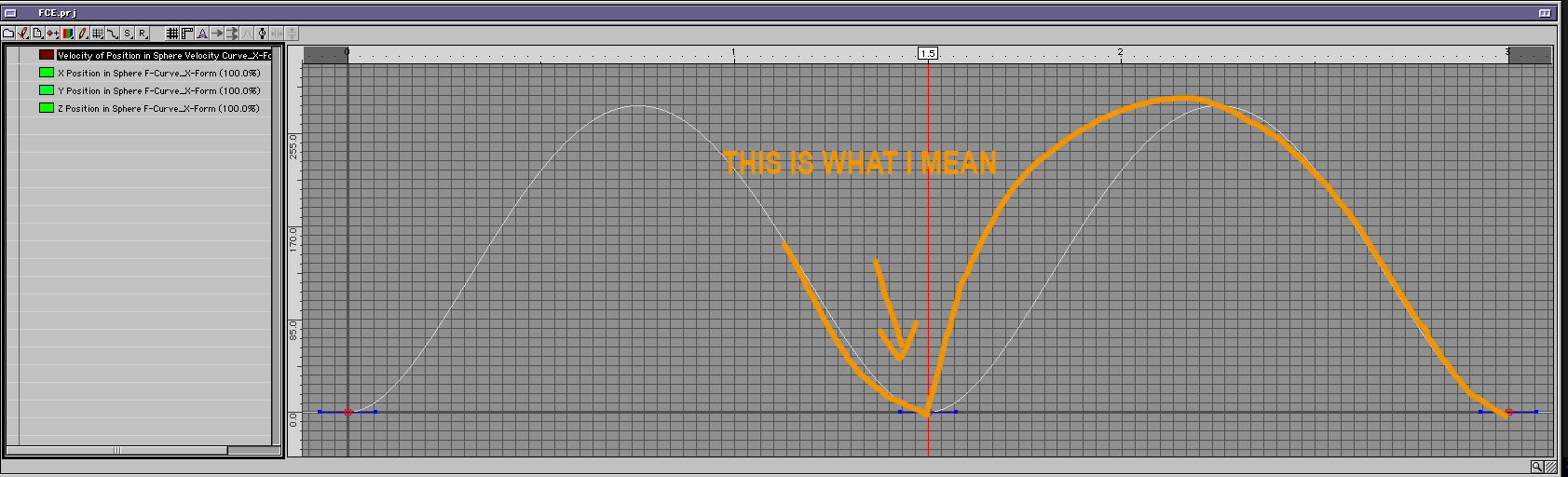
Thank you Tom, I appreciate your help as always. See?, this is what I mean about the animator manual. If you say that you can break the handles, explain in what cases you can do it and in what cases you can't. By the way, if in the Sphere velocity curve ( the first one), I want the sphere to accelerate then to stop in the second keyframe (just as you have it set), and then accelerate reeeeeally quick again?. In this example, the ball accelerates slowly, then it slowly stops, and then slowly accelerates again, and then it slowly stops. Couldn'i it be done that yo could break the the handles in that curve (I don't mean that you can do it nowm just a suggestion for future versions), or is it imposible for technical reasons, I don't know. Becouse I like to control the handles and the curves of the position in the viewports, it gives me an instant feedback as were the position of my groups are, but I would love to have more control of the velocity in the FCE
-
Hi, in the animator manual says that to break the handles of a keyframe in the FCE you have to: Breaking Handles. Ctrl-Alt clicking (Cmd-Opt click on Macintosh) on a key will break or mend the control handles. It doesn't work for me. I upload the position channel to the FCE, I Cmd+click on it and nothing happens, if I move one of the handles, the other one moves as well. I suggest that in the next version of EIAS they rewrite some parts of the animator manual, specially the ones regarding the FCE, sometimes is very confusing. Thanks!!!