apu
-
Posts
91 -
Joined
-
Last visited
Content Type
Profiles
Forums
Events
Everything posted by apu
-
Hi Buzz talking about scale, what's a good scale for a person if I'm gonna cloth it?. In EI units. Because in the project that I posted the human model was about 130 EI units.
-
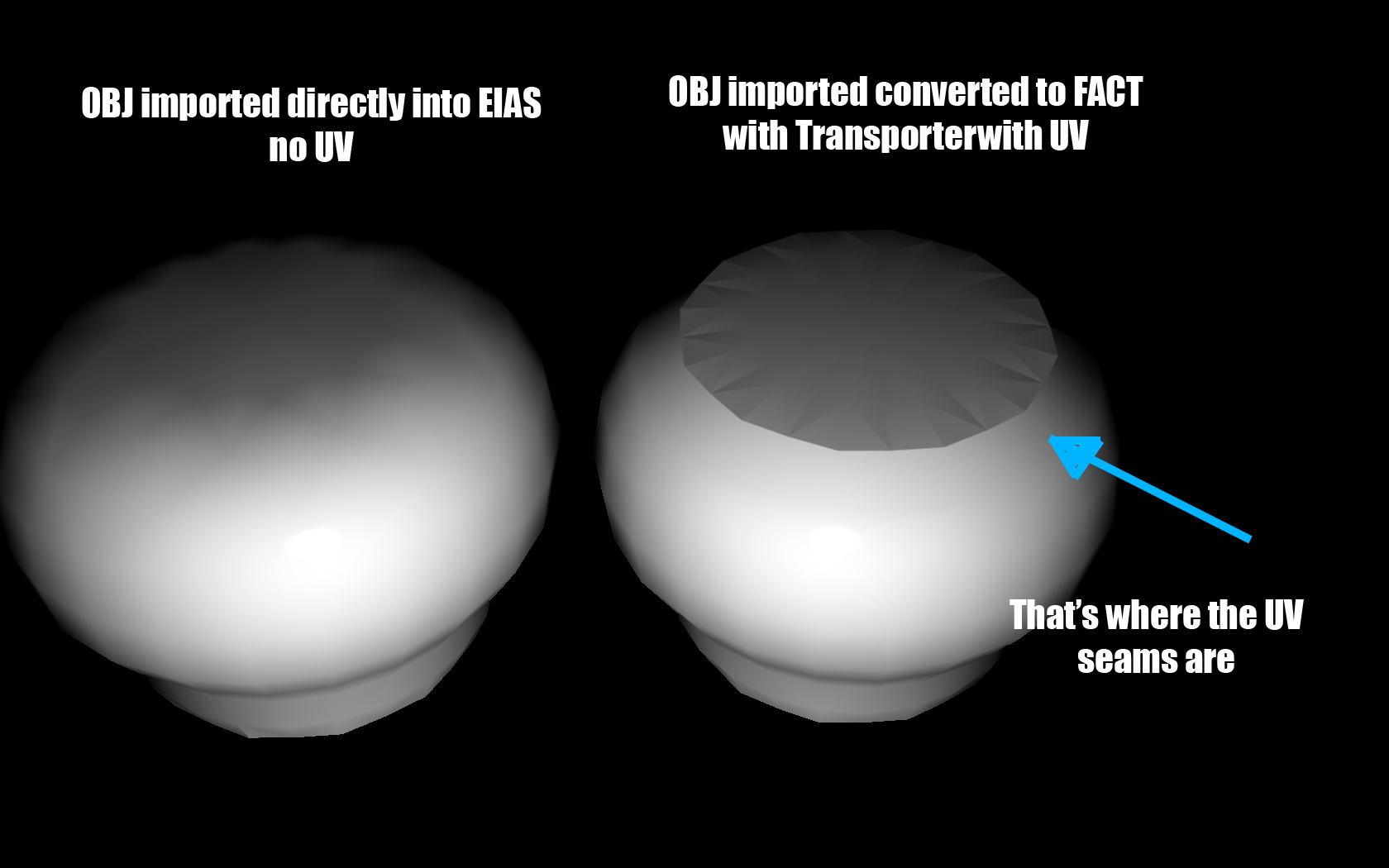
Hi, attached I post an image with a OBJ model imported into EIAS directly, and a OBJ model converted with transporter into FACT and then imported into EIAS. The issue is that I UV unwrapped the model and exported the UVs in Silo. When I import it direcctly into EIAS, I loose the UV information (I'm not able to check the "Use UV space" checkmark. If I import it into Transporter (I select the obj and the mtl at the same time and then export it to fact) and then I bring it to EIAS, I'm able to check the "Use UV space" checkmark, but the model is no smooth in the parts where the UV seams where. Why is that? Thank you

-
Thanks richard for your time. I've given up on it. It's exploding everytime I run a simulation. It takes too much time. I hope that in a near future EIAS will come with a softbody simulator more stable.
-
I haven't tried that. I'll give it a shot
-
OK, Thanks, when I get home I'll probably do it.
-
Anyone knows how can I get Alonzo DVD about rigging? I was trying to find a web site or something but no luck
-
Actually I was trying with a denser mesh, so de deformations under the arms are smoother. It runs till frame 60 without exploding. Last time it was frame 44, so I gained 16 frames!!!. I'm still testing, let se if I can come up with something. Alonzo, pleeease, give us some tips!!!!
-
Yes Richard, thanks for trying. the same problem ocurred to me. About frame 30 or something, the geometry of the simcloth messes up and becomes a bunch of weird polygons. You are right, it gets like that when it gets too bent, just when the arms pass near the torso. Pity, because that means no clothing characters can be made. Just simple stuff. Grrrrrrrr!!!!
-
Hi Richard. I was playing with the settings and it worked right until the salesman started to walk, when his arms where passing near the body, that's when the weird polygons flying all over the place happened. I guess you can only check what I'm telling you when you open the project with the guy walking. Attached I send you the models so you can open it. Thank you again!!! Model Folder.zip
-
I put the title of this post like that cause I think Richard is the most skilled one when it comes with simcloth, but anyone should feel free to try this test. Attached there is an animator file of a man walking. I'm trying to dress him with a gown type clothing. I've been racking my brain trying to get the settings right, so simcloth would not break the geometry in weird triangles, but I can't get it right. If anyone can help I've very greatful Thanks!! ANIMATOR.zip
-
Tom, what do you mean with "have some catch here.."?
-
I'm up for it. 40 bucks seems like a really reasonable price. It seems to have a lot of possibilities. It seems to have a lot of character animation tools, that is what EIAS lacks. Animate in Messiah, render in EIAS!!!
-
Hi Richard, I just saw your project. Amazing. Thank you very much. I just had no idea about scaling the objects could affect simcloth so much. Whats a good scale for simcloth? I mean EI units, couse I saw that the arm in your project was about 100 units long. If its too small (like 1 unit) simcloth will not make the simulation properly, right? Again, thank you very much for your answer. Apu
-
Thanks for your answers! I m travelling and i wont be able to check it out until next week, but ill post my results!!
-
Look at this video: I think that EI users need a really good riiging tutorial, becouse I don't know if some of the things that the animator is able to do with this character are achie¡vable with EIAS tools, like when he puts the hand of the character push the head and then the head moves with the hand with just a single click, etc... Take a look, it's pretty cool.
-
Thank you Buzz. Attached is the simcloth project. Lets see if you can figure out the solution , becouse I surely cannot!!!!. Thanks a lot, I appreciate it very much your help. Apu SIMCLOTH.zip
-
Hi. Attached are two simcloth test of an arm like object moving and a cloth that reacts to it. I,ve been playing with the collision tolerance and solver precision settings to get the look that the cloth is in fact reacting to the movement of the arm. The problem is that in order to avoid the cloth penetrating the arm, I have to set the collision tolerance real high, and the look I get is like the cloth is floating on top of the arm, that they don't get to touch. If I set it too low, the cloth penetrates the arm. Any ideas, suggestions? Simcloth seems like such a great plug in, but this kind of problems ∞¢#@#¢∞ off!!!!!! Thanks!!!! Test 1.mov Test 2.mov
-
Great!!. I love it, it looks like a willy wonka factory sort of thing!!. It has magic, fantasy. How did you made the chips follow the rail?. And how they fell?. And the doors?. Rodeo?. Or hand animated? Anyway, great work, lots of detail. I guess it has taken a lot to render each frame, with all those reflections. Keep it up!!!
-
No problem, it was me doing it wrong, I was rendering windows size. Once I did the actual size render everything looked nice!!
-
Hi, I have this artifacts in my shadows. How do I get rid of them?. I'm using GI with adaptive skymap Thanks!!!

-
Thanks Ian, how can I upload it?
-
Hi I'm trying to export a camera from aftereffects to eias with the mocon? Script and when i import the motion the camera is all messed up. I tracked a shot using pftrack and i exported it as fbx first but when i bring it to eias it doesnt work well. Them i brought the motion data into aftereffects from pftrack and it works . So i tried to export the camera from afx into eias and i ave the problema i mentioned . Please help, i'm desesperate!!! Thanks
-
Hi I have a live action footage of a bar. I tracked the camera with PFTRack and imported the camera movement into EIAS. I want to render some beer bottles and composite it into the live action footage for product placement. The problem is that I have some beer bottles and I placed them on top of a plane model that acts as the table where I am going to cast the shadows into. If I turn GI on, I can't get a shadow mask of the plane. How can I isolate the shadows so I can composite it into the live footage?. Cause I need the GI illumination to get the feeling that the bottles are "touching" the table. I need realistic shadows. I turned on raytrace softshadows with GI optimization on, because if not, the render times are too long. Any suggestions?. Other times, what I did is to render two passes, one of the whole scene, and the other one of the alfa channel of the bottle. What I did then is composite the whole scene render with multiply layer mode (this works if the plane acting as table/floor is white), and then on top the same image with the alfa of the model. But as I said, this only works if the plane is withe, and the illumination is with based. But in this case, I have neon lights, red, lights, green lights, etc.... Please, help, I'm desperate!!!!!
-
You have to select the simcloth plug in once you have ran the simulation and then export as fact with preserve deformation checked (I don't know if this is necesary but I did it anyway) and then if you import it back, you have the cloth static Hope this helps
-
Keep trying Tom, this would be sooooooooo cooool!!!!!! This is what EIAS needs to get back on top!!!! Cheers