Tomas Egger
-
Posts
3514 -
Joined
-
Last visited
-
Days Won
20
Content Type
Profiles
Forums
Events
Everything posted by Tomas Egger
-
Ola my friends, We are working really hard here, its our first upgrade, so, we are doing as much as possible to make our user base workflow easier :) About ArchiCAD plug-in, lets release 9 and after that take a closer look in this issue. Thanks Tom
-
Ola Mat, Sorry for my delay :) Did you see this tutorial which I posted? take a look in the settings, GI and Photons. Any doubt, message me. Thanks Tom
-

Sydney EIAS freelance animator wanted
Tomas Egger replied to ShaneGirl's topic in EIAS General Forum
Ola Shane, Do you have problems with outsourced work? from other countries? Thanks Tom -
Sydney EIAS freelance animator wanted
Tomas Egger replied to ShaneGirl's topic in EIAS General Forum
Ola Shane, Which kind of work, Motion Graphics? Character Animation? Thanks Tom -
Ola Brian, Remember we personally take care of plug-ins / Shaders bundled in EIAS and these Konkeptoine tools: http://www.eias3d.com/products/konkeptoine-plugins/ About Camera 9, you will see when you play with it, since the memory management is totally new :) But, you will be able to work in the way you want, 8 cameras with 1 core each, 4 cameras with 2 cores.. if you choose 8 cores with 2GB of ram, the limit will be 2GB, but Camera handle memory differently now. Hope that helps Thanks Tom
-
Ola Brian, When I wrote about plug-ins and shaders will not be available to 64 bits? :) Right now, the best way in particular for me is have Rama + 1 Camera per machine - slave using all cores (a lot more practical), sometimes, I use in 32 bits mode when I dont need more Ram than 2GB and sometimes, to huge scenes and huge frame size, I can assign more than 2GB in the 64 bits mode. :) Thanks a lot Tom
-
Ola Brian, I cant share info about third party tools and Rama will be available for sure.:) Thanks Tom
-
Ola Brian, All plug-ins will use all cores :), but you will be able to choose 32 bits (2GB RAM limit) or 64 bits on Camera settings (all RAM you have :)). To use 64 bits, the plug-ins and shaders need to be updated, so, the third party tool developer need to take care of it. Its why we released the EIAS 9 SDK some months ago. Hope that helps Thanks Tom
-
Ola, They run in EIAS 9 and Camera in 32 bits architecture mode. Thanks Tom
-
Ola Michael, Awesome as always!!! Thanks Tom
-
Ola Blair, Thanks Tom
-
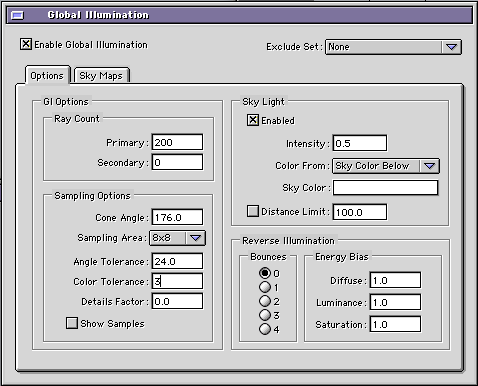
Ola Victor, Your Animations are improving more and more :) Please, pay attention in your transitions in your compositing software or editing software, a few them are “blinkingâ€, the cross fade is wrong a bit. One of the scene which have plates in the tables, the contact shadows are blinking a bit, use a bigger value in Color Tolerance , like 3.0 or a bit more. Really GREAT works. Hope that Helps Thanks Tom
-
Ola Rob, I had the Mac Installer.. let me try to find, maybe the PC installer is included. Thanks Tom
-
Ola Thomo, Joe Tucciarone can help me here, but if am I not wrong, he uses Zbrush for detailed Space Asteroids for example. Thanks Tom
-
Ola Athena, Do you have a Hardware Dongle or are you trying to test EIAS? EIAS 8 dont have a DEMO version, we plan to release a DEMO version with our next upgrade EIAS 9. Hope that helps Thanks Tom
-
Ola, Probably, the problem is related with the latest Silo build which export empty scenes in .fact format. Thanks Tom
-
Ola Phungus, Yes, but we only started to develop after the buyout in January 2010. We are almost there ;) Thanks Tom
-
Ola Rick, Cool!!! Thanks Tom
-
Ola Vic, I will be waiting! Thanks Tom
-
Ola Brian, You will be able to specify number of cores, memory, 32 or 64bits architecture too ;) Thanks Tom
-
Ola, Brian, we will release the list in the release day ;) Thanks Tom
-
Ola Vic, No, Everything is correct! Entrada opens fine too? Are you in a Mac or PC? Please, if you want, collect both and send me. Thanks Tom
-
Ola Rich, Its a pleasure to see you doing this images.. :) Thanks Tom
-
Ola Brain, Its a bug in the latest Safari update, we are waiting Apple :( Click again the vimeo error window, it will jump directly to Vimeo. Thanks Tom
-
Ola Rich, “I like the Parallel Sun, but as Mr. S pointed out, I can get a "softer" sunlight using spots. But the idea of setting up 15-20 Spots in place of a Parallel seems daunting. Maybe a gigantic Illuminator?†A Illuminator will waist a lot of Rays, because, only a few will cross the windows (Raytrace) and slow down the render. I like Parallel Sun too, lets see what will happen soon.. :) Thanks Tom