Thomo
-
Posts
314 -
Joined
-
Last visited
-
Days Won
3
Content Type
Profiles
Forums
Events
Everything posted by Thomo
-
Ok. I've discovered that I can open the resultant DOF.psd file in Animator and change it's gamma to 2.2 (in my case) and it shows a correct image. Now how do I save this as a readable file out of Animator? I do an image "save as" which gives me no file format options, and it is an unreadable file into Photoshop. Any help appreciated. Thanks
-
I know this has been discussed before and using DOF in any thing other than Gamma 1.0 creates an "incorrect" result. I get really dark images using gamma 2.2. How do I correct this result in Photoshop? I don't understand what is actually happening so it is difficult to correct. Any help please? Thanks
-
Hi, I've asked this question a few times. Is it possible to get email notifications from this forum of responses? It used to be possible. I think this would help more users to interact. Is there a reason why not? Thanks
-
I am really not clear on why the clip maps work faster with irradiance checked to on. It can only be activated with transparency set to raytrace. It is a good thing to know to speed up rendering with clip maps though! Same with the raytrace recursion, maybe not an intuitive way to do it but the feature is there. Glad you liked the trees. I find them really useful.
-
I use these trees a lot in EIAS. They work great. Free one's here to try. https://xfrog.com/ Just a couple of things if you are not used to them. I use the .obj files. They import well into EIAS. Import settings. ("merge all" and "by material") Usually need to exchange the Y and Z axis too. I use "RGB only" in the diffuse and then copy and paste to the clip channel with "alpha only" set. In EIAS 9 set the transparency to raytrace and set to irradiance. Renders much faster. If you get some bad clips which come out black, up the raytrace recursion in the render window to 20+ That's about it, volume transmission works well for coloured shadow effect. All good!
-
I don't know why, even if I "follow a topic" I don't get email updates. Some say this forum "doesn't have 'em", I reckon it should! Maybe I'm missing something but is their a reason why we don't get email updates? Thanks
-
Ok thanks nige. I'll try that. Thanks Steven. What I really wanted was a post production layer. Ta
-
I agree this is especially important to move forward. "Website wish list 1) regular news updates or a blog its nice to know if you guys are still alive 2) more artist interviews talking about how and why they use EIAS. 3) Update the website with decent video tutorials even selling them if the quality is there. 4) Do an Eshop like daz for selling content (models, textures, HDRs, etc) to help generate income"
-
Hi, I was wondering if anyone has a more updated approach to this. I Was led to believe maybe V9 would and may yet, automate this. This is what I do now, (this is about 5 years ago), thanks to Dave I think from memory. Thanks, "With EIAS 66's arrival (and no Occlusion shader for it), I thought it was time to share this tip. Note: Do a save project as or just remember to not save it after setting off the render.. 1. Turn off all lights 2. Add a master material 3. Open the mater material and uncheck 'use polygon colour' 4. Select: By type: Groups - Assign everything to the new master material 5. Open the GI window 6. Turn on GI 7. Primary rays 100, secondary 0, NO bounces, colour to white, intensity to 1. 8. Turn on distance limit (set to whatever you normally set the Scan Angle to in occlusion - 100 is a good start). 9. Render More rays will produce smoother results but as you'll be layering it on top you probably won't notice the difference above 100... For animated occlusion passes you might want to put the grid size down to 4x4."
-
What is the best way to do a star effect (light streaks) on a light. Can I do in EIAS or just do in post? Only on still images for me.
-
Yes I have the same Tomas, I thought I sent you a sample a while back? Would like to know if there is a fix. Thanks,
-
I think the slaves are in the Application download itself. Just download for what OS you use and the RAMA slave is in there. Not the same as before, so no individual slave files.
-
Sorry if this maybe a bit off topic but I know some users have this sorted out with EIAS, V9 is what I am using. In order to have a faster file transfer from master to slave(s) I can get much better performance with a Gigabit network, yes? The photon maps are the thing that really drags on rendering time it seems. They are quite large. As I have it now. I have a modem router 10/100 connected to 4 PC slaves. If I add a 1000base T hub after this 10/100 router/modem and then connect my render farm slaves to the 1000 hub is that what should be done? My master is a modern Mac so it has 1000base T. I also have the right network cards in the slaves (PC). I am not particularly good with networking but I have read a bit on the web which seems to say this is the way to set it up. My real question is; Can use my current 10/100Base T router with a 1000Base T hub and then go from there. So in my current setup all I would need to get is a 1000Base T hub? Thanks for any advice,
-
Ok I can do it in layers, forgot about that. Was trying to do it the old way. Thanks
-
I've forgotten how to set some objects in a scene to be just masks. I used it a long time ago. And it's really late here :-) Thanks
-
And set the shadow casting objects to be shadow only.
-
Can anyone please let me know why I don't receive any forum notifications via email or digests or anything!? It seems this doesn't help to make a useful forum wherein people get prompt feedback and can offer useful insight. Personally I think it is an important element for any software package. This has gone on for a long time now, for me and others,nothing has changed. It would be good to sort it out. Thanks
-
Well I'll be. That's great! Thanks Steven.
-
Is it possible to just move groups or objects above and below each other in the project list? I know this is probably a pretty newbie question. I can move it and it will parent to another but is it possible just to re-order the list by dragging? Or is there another way? Thanks
-
Thanks Alex, I have done that but some parameters seem to not come through. I'll try it again and see if was just a one off occurrence, I can't remember which parameters didn't come through. Greg BTW. Is there some reason why I don't get email notification of responses? This has happened in the past, been fixed and seems to be happening again. Thanks again
-
Ahh! Thanks Alex I hadn't thought of that.
-
How do I move an area light without zooming in and out to grab the middle. I want to move it in one go, no changes. Is there a hotkey or something so I don't have to zoom in and out. Otherwise I get the head or the tail individually. Alos I have tried selecting a whole bunch of lights, copying them and then nudging the copies to a new location. When I quit out of EIAS and come back in, all the "tails" or distance arrow heads have defaulted back to their original location. The light body stays to the moved place ok. Are there any hidden tricks to moving and copying lights? Also, what is the best way to export and then import a light into a new project, keeping all the parameters. Any help much appreciated. Thanks
-
Great news, I just bought it, where do I download it?
-
Thanks, that's the answer I was hoping for, great. Is the proxy plugin ready for V9, does anyone know?
-
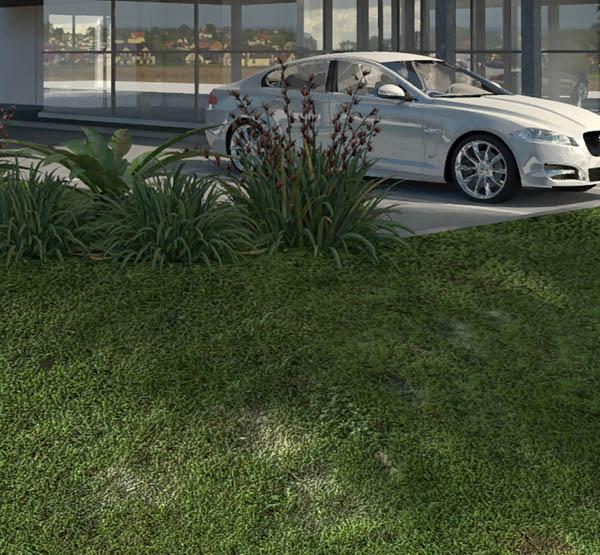
Hi Michael, Thanks for the reply. I have tried the Anisotropic shader with limited results, probably due to my skill with it. I've heard Mforge is a suped up version but I am reluctant to buy it if it doesn't quite do what I need. That grass is a 3D model. That is a pretty old one. We use a combination now of 3D grass blades, clipping planes with grass maps and textured bump mapped models. Comes up better and fast to render. The attached is an example. Thanks